Freeware changed my NewTab setting to a BING default... I want Google back

Freeware (since uninstalled) left Bing droppings in Firefox. I have changed my homepage back to Google News and the search box in the upper right corner back to Google... but when I click the NewTab icon on the toolbar it still defaults to a Bing search.
I changed the "keyword:ULR" from Bing back to Google as per a help search, but that did not fix it. Every NewTab opens with Bing. How do I change this?
Ändrad av Trivette
Alla svar (4)
Didn't work. I have no "Bing Bar" Add Ons or as a program to be removed.
A new clue: When I add the "NewTab" icon (View > Toolbars > Customize > (drag to toolbar) > Done... it does not save for the next time I open Firefox or even when I open a new tab in a currently running browser. This use to be a valued icon on my toolbar. This is the same "NewTab" that always opens with a Bing search window. :(
Update: I updated to version 7.0.1 and that did fix the NewTab-icon-not-saved problem since in the newer version the "+" to add a tab is the default on the toolbar... however, clicking that "+" still brings up the Bing search page. :(
(btw, I found that the offending Freeware also left its Bing droppings in Chrome, but that was easy to fix.)
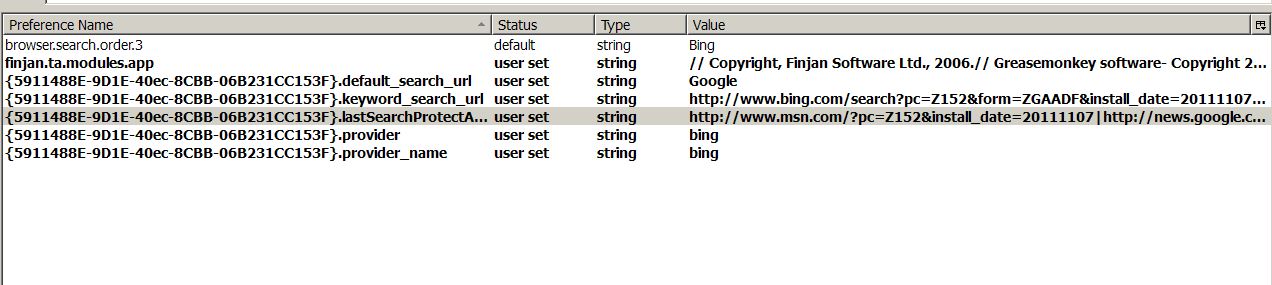
Update: I found 7 lines of code in the Config file that have the word "Bing"
(see attachment)
The first line controls the order of the drop-down search box... Bing IS 3rd I changed the 3rd line to read "Google" instead of "Bing" but no idea what it controls. I don't know how to change lines 4 and 5 or what they control I could change lines 6 and 7 to "Google" ...
anyone have any idea what these control?