


Lost my emails on upgrade to 153.4.0 esr

Firefox said to update to 153.4.0 esr to continue to use Google Calendar. I did and was able to recover the calendar. But the upgrade lost all my emails and folders. Previous answers for lost emails have not worked. Please give me a step by step procedure to recover my emails. Thank you
Alla svar (3)
Hi Mike,
I'm sorry you're dealing with this. Before making any changes to Thunderbird, it's important not to delete or move your existing Thunderbird profile, since your messages may still be stored there.
Could you first tell us which operating system you're using and whether your email accounts are POP or IMAP accounts?
Also, when you open Thunderbird's Account Settings, do your accounts and folders still appear, or are they completely missing? That will help us determine whether Thunderbird has started using a different profile or whether the mail folders themselves are no longer being detected.
If you can provide those details, we can go through the recovery steps carefully without risking the existing mail.
1. I am using Windows 11 Home version 25H2.. I have always used POP but this upgrade to ESR came up automatically as IMAP. I am trying to follow the FAQ for changing that to POP but found it generated an Authentication Error. I've sent a help request to Fastmail to ask what we can do about that. Maybe everything will come back when I can tell Thunderbird it is a POP account.
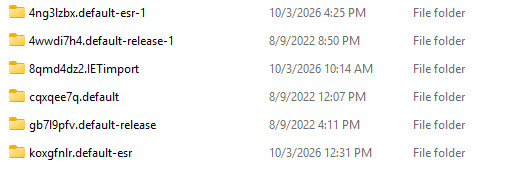
2. My account is present in Account Settings but none of my folders or emails are. I have attached a screen shot of the directory where my profiles are. C:\Users\mruby\AppData\Roaming\Thunderbird\Profiles I've not messed with them.
Hi Mike,
That gives us a useful clue. Since you were using POP, your old messages were probably stored locally in your Thunderbird profile rather than on the Fastmail server. The account now appearing as IMAP does not necessarily mean that the old mail has been deleted.
Please don't delete the existing profile or remove the IMAP account yet.
Because you have several profiles in that folder, the first step is to find out which one contains your old POP mail.
Close Thunderbird completely. Open File Explorer and go to:
C:\Users\mruby\AppData\Roaming\Thunderbird\Profiles\
Open each profile folder and look for a folder named Mail. Inside it, look for a folder that corresponds to your Fastmail POP account. Don't change or delete anything at this stage.
If you find a Mail folder containing files named Inbox, Sent, or the names of your other folders, that's a good sign. Those files contain the locally stored messages. Files ending in .msf are only index files and do not contain the messages themselves.
Could you post a screenshot showing the contents of the Mail folder in each profile? In particular, we need to see whether one of them contains your old Fastmail POP folders.
Once we find the correct profile and mail folder, we should be able to restore the messages without risking your existing data or needing to change the account back to POP.