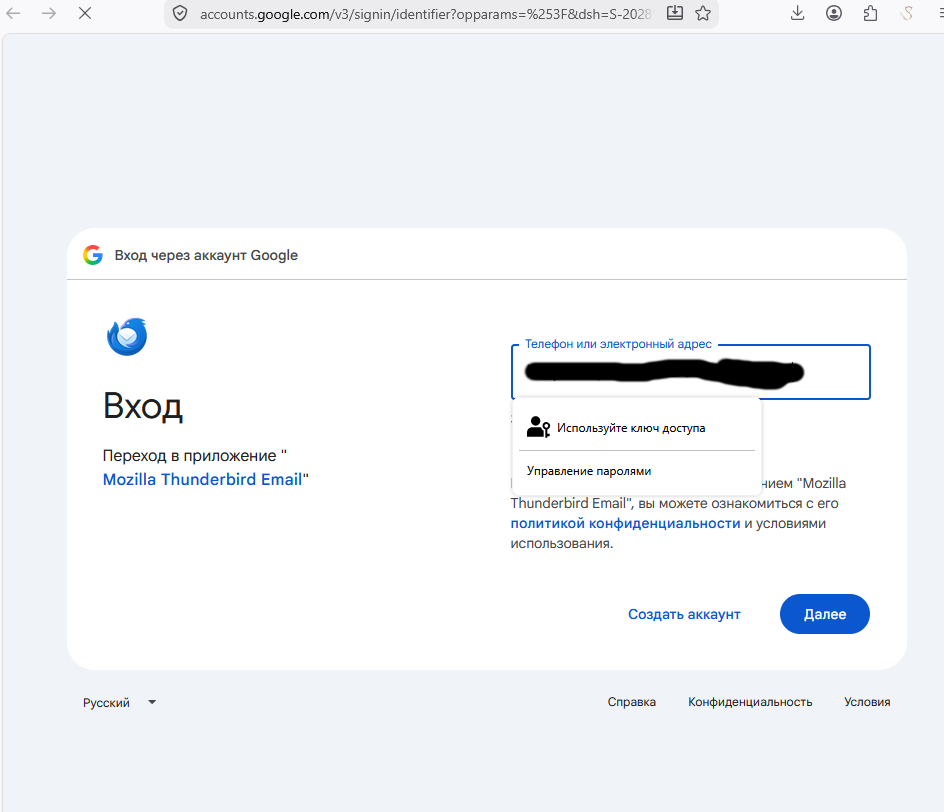
beta 3 is stopped getting mails

Hello. i have latest beta 156.b3 64bit, after updating to beta 3 my tb offer retry passwords to many google acccounts and opening FireFox for again login in to each account. I have turned off checking mails on the start up for them and turn off checking mails, but again and again opening firefox for signing in. i closing firefox but TB not continue checking mail from another mailboxes, they stopped and seems like waiting for signing. i try to manually click for each mailbox "get message", but this no work, could you help me turn off login through firefox?
Alla svar (12)
If you return to 156.0b2, does the problem go away? https://ftp.mozilla.org/pub/thunderbird/releases/156.0b2/win64/
Wayne Mery said
If you return to 156.0b2, does the problem go away? https://ftp.mozilla.org/pub/thunderbird/releases/156.0b2/win64/
Hello. i still not downgraded to 156.0b2, but i have upgraded to 157b2, but every time for re-authorisation for someone mail box Thunderbird opening Firefox for Re enter password, how to prevent this way? How to get standard old window of the Thunderbird? Is it possible?
Ändrad av kolich69
i have downgraded to 156.0b2, but TB requires create a new profile and con not continue with my old profile, i have upgraded again to the latest beta. Do you have some tips for my issue?
Wayne Mery said
If you return to 156.0b2, does the problem go away? https://ftp.mozilla.org/pub/thunderbird/releases/156.0b2/win64/
Could you help me Please.
Wayne Mery said
If you return to 156.0b2, does the problem go away? https://ftp.mozilla.org/pub/thunderbird/releases/156.0b2/win64/
Today i have removed mailbox which TB requiring for reAUTH, but TB after startUp too requiring reAUTH for reemoved mailbox, crazy?! Whats i need to do next?! Seems like is very stupid bug. Could you help me?

every time for re-authorisation for someone mail box Thunderbird opening Firefox for Re enter password, how to prevent this way?
Why prevent this, and how is it a problem in the first place?
If there is any error message, please post screenshot(s). https://support.mozilla.org/kb/how-do-i-create-screenshot-my-problem
Also , please post your Troubleshooting Information. At the top right of the Thunderbird window, click the menu button ≡, then select Help > Troubleshooting Information. Press the "Copy text to clipboard button" and paste the information into your reply.
Name: Thunderbird
   Version: 157.0b2
   Build ID: 20260915185926
   Distribution ID:
   Update Channel: beta
   User Agent: Mozilla/5.0 (Windows NT 10.0; Win64; x64; rv:157.0) Gecko/20100101 Thunderbird/157.0
   OS: Windows_NT 10.0 26200
   OS Theme:
   Launcher Process: Enabled
   Multiprocess Windows: 0/0
   Fission Windows: 0/0
             Enabled by default
   Remote Processes: 4
   Enterprise Policies: Inactive
   Google Location Service Key: Found
   Google Safebrowsing Key: Missing
   Mozilla Location Service Key: Missing
   Safe Mode: false
   Memory Size (RAM): 95.9 GB
   Disk Space Available: 21.7 GB
 Mail and News Accounts
   account1:
     INCOMING: account1, , (imap) imap.mail.yahoo.com:993, SSL, OAuth2
     OUTGOING: , smtp.mail.yahoo.com:465, SSL, OAuth2, true
   account2:
     INCOMING: account2, , (none) Local Folders, plain, passwordCleartext
   account3:
     INCOMING: account3, , (imap) imap.gmail.com:993, SSL, OAuth2
     OUTGOING: , smtp.gmail.com:465, SSL, OAuth2, true
   account4:
     INCOMING: account4, , (imap) imap.mail.yahoo.com:993, SSL, OAuth2
     OUTGOING: , smtp.mail.yahoo.com:465, SSL, OAuth2, true
   account5:
     INCOMING: account5, , (imap) imap.gmail.com:993, SSL, OAuth2
     OUTGOING: , smtp.gmail.com:465, SSL, OAuth2, true
   account8:
     INCOMING: account8, , (imap) imap.mail.yahoo.com:993, SSL, OAuth2
     OUTGOING: , smtp.mail.yahoo.com:465, SSL, OAuth2, true
   account9:
     INCOMING: account9, , (imap) imap.gmail.com:993, SSL, OAuth2
     OUTGOING: , smtp.gmail.com:465, SSL, OAuth2, true
   account10:
     INCOMING: account10, , (imap) imap.gmail.com:993, SSL, OAuth2
     OUTGOING: , smtp.gmail.com:465, SSL, OAuth2, true
   account11:
     INCOMING: account11, , (imap) imap.gmail.com:993, SSL, OAuth2
     OUTGOING: , smtp.gmail.com:465, SSL, OAuth2, true
   account12:
     INCOMING: account12, , (imap) imap.gmail.com:993, SSL, OAuth2
     OUTGOING: , smtp.gmail.com:465, SSL, OAuth2, true
   account13:
     INCOMING: account13, , (imap) outlook.office365.com:993, SSL, OAuth2
     OUTGOING: , smtp.office365.com:587, alwaysSTARTTLS, OAuth2, true
   account14:
     INCOMING: account14, , (imap) outlook.office365.com:993, SSL, OAuth2
     OUTGOING: , smtp.office365.com:587, alwaysSTARTTLS, OAuth2, true
   account15:
     INCOMING: account15, , (imap) imap.gmail.com:993, SSL, OAuth2
     OUTGOING: , smtp.gmail.com:465, SSL, OAuth2, true
   account16:
     INCOMING: account16, , (imap) outlook.office365.com:993, SSL, OAuth2
     OUTGOING: , smtp.office365.com:587, alwaysSTARTTLS, OAuth2, true
   account19:
     INCOMING: account19, , (imap) imap.gmail.com:993, SSL, OAuth2
     OUTGOING: , smtp.gmail.com:465, SSL, OAuth2, true
   account20:
     INCOMING: account20, , (imap) imap.gmail.com:993, SSL, OAuth2
     OUTGOING: , smtp.gmail.com:465, SSL, OAuth2, true
   account21:
     INCOMING: account21, , (imap) imap.gmail.com:993, SSL, OAuth2
     OUTGOING: , smtp.gmail.com:465, SSL, OAuth2, true
   account22:
     INCOMING: account22, , (imap) imap.gmail.com:993, SSL, OAuth2
     OUTGOING: , smtp.gmail.com:465, SSL, OAuth2, true
   account23:
     INCOMING: account23, , (imap) imap.gmail.com:993, SSL, OAuth2
     OUTGOING: , smtp.gmail.com:465, SSL, OAuth2, true
   account24:
     INCOMING: account24, , (imap) imap.mail.ru:993, SSL, OAuth2
     OUTGOING: , smtp.mail.ru:465, SSL, OAuth2, true
   account25:
     INCOMING: account25, , (imap) imap.gmail.com:993, SSL, OAuth2
     OUTGOING: , smtp.gmail.com:465, SSL, OAuth2, true
   account26:
     INCOMING: account26, , (imap) imap.gmail.com:993, SSL, OAuth2
     OUTGOING: , smtp.gmail.com:465, SSL, OAuth2, true
   account27:
     INCOMING: account27, , (imap) outlook.office365.com:993, SSL, OAuth2
     OUTGOING: , smtp.office365.com:587, alwaysSTARTTLS, OAuth2, true
   account29:
     INCOMING: account29, , (imap) imap.mail.yahoo.com:993, SSL, OAuth2
     OUTGOING: , smtp.mail.yahoo.com:465, SSL, OAuth2, true
   account30:
     INCOMING: account30, , (imap) imap.gmail.com:993, SSL, OAuth2
     OUTGOING: , smtp.gmail.com:465, SSL, OAuth2, true
   account32:
     INCOMING: account32, , (imap) imap.gmail.com:993, SSL, OAuth2
     OUTGOING: , smtp.gmail.com:465, SSL, OAuth2, true
   account33:
     INCOMING: account33, , (imap) imap.mail.yahoo.com:993, SSL, OAuth2
     OUTGOING: , smtp.mail.yahoo.com:465, SSL, OAuth2, true
   account34:
     INCOMING: account34, , (imap) imap.gmail.com:993, SSL, OAuth2
     OUTGOING: , smtp.gmail.com:465, SSL, OAuth2, true
   account35:
     INCOMING: account35, , (imap) outlook.office365.com:993, SSL, OAuth2
     OUTGOING: , smtp.office365.com:587, alwaysSTARTTLS, OAuth2, true
   account36:
     INCOMING: account36, , (imap) outlook.office365.com:993, SSL, OAuth2
     OUTGOING: , smtp.office365.com:587, alwaysSTARTTLS, OAuth2, true
   account39:
     INCOMING: account39, , (imap) outlook.office365.com:993, SSL, OAuth2
     OUTGOING: , smtp.office365.com:587, alwaysSTARTTLS, OAuth2, true
   account40:
     INCOMING: account40, , (imap) outlook.office365.com:993, SSL, passwordCleartext
     OUTGOING: , smtp.office365.com:587, alwaysSTARTTLS, passwordCleartext, true
   account41:
     INCOMING: account41, , (imap) imap.mail.yahoo.com:993, SSL, OAuth2
     OUTGOING: , smtp.mail.yahoo.com:465, SSL, OAuth2, true
   account42:
     INCOMING: account42, , (imap) imap.mail.yahoo.com:993, SSL, OAuth2
     OUTGOING: , smtp.mail.yahoo.com:465, SSL, OAuth2, true
   account43:
     INCOMING: account43, , (imap) imap.gmail.com:993, SSL, OAuth2
     OUTGOING: , smtp.gmail.com:465, SSL, OAuth2, true
   account45:
     INCOMING: account45, , (imap) outlook.office365.com:993, SSL, OAuth2
     OUTGOING: , smtp.office365.com:587, alwaysSTARTTLS, OAuth2, true
   account48:
     INCOMING: account48, , (imap) outlook.office365.com:993, SSL, OAuth2
     OUTGOING: , smtp.office365.com:587, alwaysSTARTTLS, OAuth2, true
   account53:
     INCOMING: account53, , (imap) imap.mail.yahoo.com:993, SSL, OAuth2
     OUTGOING: , smtp.mail.yahoo.com:465, SSL, OAuth2, true
   account61:
     INCOMING: account61, , (imap) mail.htva.net:993, SSL, passwordCleartext
     OUTGOING: , mail.htva.net:465, SSL, passwordCleartext, true
   account64:
     INCOMING: account64, , (imap) imap.hotufi.net:143, plain, passwordCleartext
     OUTGOING: , mx1.hotufi.net:25, plain, passwordCleartext, true
   account65:
     INCOMING: account65, , (imap) mail.schilling.us:143, alwaysSTARTTLS, passwordCleartext
     OUTGOING: , mail.schilling.us:587, alwaysSTARTTLS, passwordCleartext, true
   account67:
     INCOMING: account67, , (imap) imap.west-telecom.com:143, alwaysSTARTTLS, passwordCleartext
     OUTGOING: , smtp.west-telecom.com:587, alwaysSTARTTLS, passwordCleartext, true
   account69:
     INCOMING: account69, , (imap) mail.htva.net:993, SSL, passwordCleartext
     OUTGOING: , mail.htva.net:465, SSL, passwordCleartext, true
   account73:
     INCOMING: account73, , (imap) mail.ldsubmissions.com:143, alwaysSTARTTLS, passwordCleartext
     OUTGOING: , mail.ldsubmissions.com:587, alwaysSTARTTLS, passwordCleartext, true
   account77:
     INCOMING: account77, , (imap) outlook.office365.com:993, SSL, OAuth2
     OUTGOING: , smtp.office365.com:587, alwaysSTARTTLS, OAuth2, true
   account80:
     INCOMING: account80, , (imap) imap.poczta.onet.pl:993, SSL, passwordCleartext
     OUTGOING: , smtp.poczta.onet.pl:465, SSL, passwordCleartext, true
   account85:
     INCOMING: account85, , (imap) imap.gmail.com:993, SSL, OAuth2
     OUTGOING: , smtp.gmail.com:465, SSL, OAuth2, true
   account87:
     INCOMING: account87, , (imap) mail.amstein.us:143, alwaysSTARTTLS, passwordCleartext
     OUTGOING: , mail.amstein.us:587, alwaysSTARTTLS, passwordCleartext, true
   account88:
     INCOMING: account88, , (imap) mail.ldsubmissions.com:143, alwaysSTARTTLS, passwordCleartext
     OUTGOING: , mail.ldsubmissions.com:587, alwaysSTARTTLS, passwordCleartext, true
   account89:
     INCOMING: account89, , (imap) mail.iw.net:993, SSL, passwordCleartext
     OUTGOING: , mail.iw.net:465, SSL, passwordCleartext, true
   account92:
     INCOMING: account92, , (imap) az1-ss29.a2hosting.com:993, SSL, passwordCleartext
     OUTGOING: , az1-ss29.a2hosting.com:465, SSL, passwordCleartext, true
   account93:
     INCOMING: account93, , (imap) imap.gmail.com:993, SSL, OAuth2
     OUTGOING: , smtp.gmail.com:465, SSL, OAuth2, true
   account94:
     INCOMING: account94, , (imap) mail.ldsubmissions.com:143, alwaysSTARTTLS, passwordCleartext
     OUTGOING: , mail.ldsubmissions.com:587, alwaysSTARTTLS, passwordCleartext, true
   account96:
     INCOMING: account96, , (imap) imap.gmail.com:993, SSL, OAuth2
     OUTGOING: , smtp.gmail.com:465, SSL, OAuth2, true
   account98:
     INCOMING: account98, , (imap) mail.ldsubmissions.com:143, alwaysSTARTTLS, passwordCleartext
     OUTGOING: , mail.ldsubmissions.com:587, alwaysSTARTTLS, passwordCleartext, true
   account102:
     INCOMING: account102, , (imap) imap.mail.yahoo.com:993, SSL, OAuth2
     OUTGOING: , smtp.mail.yahoo.com:465, SSL, OAuth2, true
Libraries
     Library
     Status
     Expected minimum version
     Version in use
     Path
       RNP (OpenPGP)
       OK
       0.18.1
       0.18.1.MZLA.157.0b2.botan.3.11.1
       C:\Program Files\Mozilla Thunderbird Beta\rnp.dll
christ1 said
every time for re-authorisation for someone mail box Thunderbird opening Firefox for Re enter password, how to prevent this way?Why prevent this, and how is it a problem in the first place?
If there is any error message, please post screenshot(s). https://support.mozilla.org/kb/how-do-i-create-screenshot-my-problem
Also , please post your Troubleshooting Information. At the top right of the Thunderbird window, click the menu button ≡, then select Help > Troubleshooting Information. Press the "Copy text to clipboard button" and paste the information into your reply.
posted, check it above. By the way, i have removed mailbox, but FF again requsting reAUTH for this mailbox.... im tired....
Thunderbird stopped checking mails in the total, TB is no working while you logining again.
TB is no working while you logining again.
This isn't helpful. Please explain in detail
- what you're doing,
- what happens, and
- what you expect to happen.
Also, please post screenshot(s) of any error messages you may get.
christ1 said
TB is no working while you logining again.This isn't helpful. Please explain in detail
- what you're doing,
- what happens, and
- what you expect to happen.
Also, please post screenshot(s) of any error messages you may get.
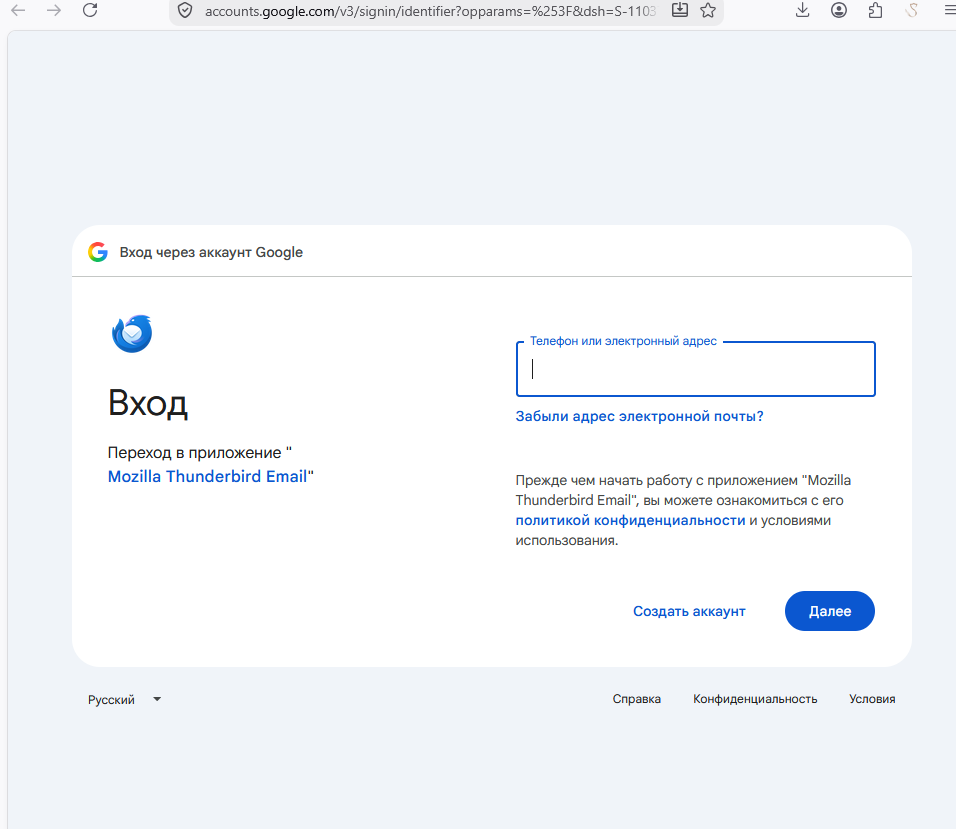
No error messages, after startup Tb, tb is opening FF with log in window for mailbox, which is already removed from the TB. I closing FF log in window and TB stopped receiving new mails or sending mails. I hope im clear to explain you? :)
christ1 said
TB is no working while you logining again.This isn't helpful. Please explain in detail
- what you're doing,
- what happens, and
- what you expect to happen.
Also, please post screenshot(s) of any error messages you may get.
To be sure, i was uploaded correct screenshot