Cannot access most of my migrated emails

I recently migrated all my LSU.edu emails over to Thunderbird. Of the nearly 30,000 messages that moved over into the Thunderbird Inbox, only 7179 are accessible (blue button), while the remaining 28,012 are listed in a greyed out button.
Please help me access these 28,000 messages.
Thank you
Brett
Alla svar (11)
Thunderbird is the email client program. It's not a server, so emails do not get migrated to Thunderbird. Emails get downloaded into the mail account. Pop accounts can only access the server 'Inbox' and download emails to pop account 'Inbox'. There is no synchronisation between any pop account folder and server folder. Emails are stored on computer and independent of server. Imap accounts synchronise imap folders with server folders. Imap accounts can only display whatever is on the server. Emails are stored on the server. Even if emails are downloaded, you should not believe you have an independent copy because it can only display what is on server. But it can be used to create backups that are independent of server.
Thunderbird has mail accounts which are for existing email addresses created with eg: ISP or Business or free ones with eg: gmail.
An 'Inbox' is in a mail account set up as either Pop or Imap protocol. There is also a default account called 'Local Folders' which can store emails independently of any mail account on your computer.
You seem to have an existing email address with LSU.edu. Do you mean you created a mail account for that LSU.edu. email address in Thunderbird ? Did you set it up as a Pop or IMAP account ?
You say " only 7179 are accessible (blue button),remaining 28,012 are listed in a greyed out button. "
It seems very odd because no emails are in 'buttons'.
The left pane is called the Folder Pane. It contains the name of the mail account and it contains folders which contain emails. At the bottom with be the 'Local Folders' account which usually has an Inbox, Trash and the 'Outbox' which is used by all account when 'Send Later' is used.
It would be helpful, if you could upload an image showing what you see, so we can visualise the problem. The image needs to be in an image file eg: jpg
Thank you for your quick reply. I had a hard time explaining. Attached is a screenshot that may help.
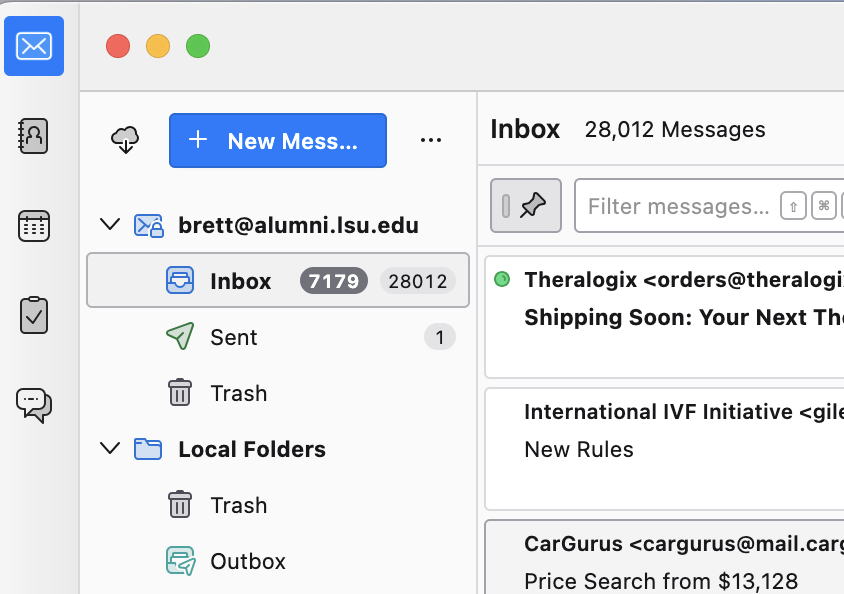

Doesn’t the number 7179 just indicate the number of messages that are unread? Are you sure that you cannot access all 28,012 messages?
Hi Rick, Thank you for responding. You are absolutely correct! 7179 is the number of unread messages.
Also what I noticed, however, is that the 28,012 messages only go back as far as 2015. Prior to moving all my messages over to Thunderbird, my LSU account went back as far as 2008. Not sure why I am missing 7 years of messages.
And finally, it appears that all the messages that did come over (both read and unread) are from my Trash or Deleted folders from my LSU account. I cannot find any important messages from my Inbox.
re : I cannot find any important messages from my Inbox.
What do you mean by 'important' ?
Thunderbird has something called 'Tags' and one of them is called 'Important' If your emails have 'important' tags, they usually do get synchronised.
Menu icon (3 lines) > 'View' > 'Folders' > select 'Tags' It opens in the left Folder Pane - usually below the 'Local Folders' account. The tags can appear empty until you click on 'Important' then Thunderbird scans emails to find out what if any have the Important Tag.
However, eg: gmail offers something called 'Important' label. All of gmails 'labels' work like tags to give a view like regular folders.
So if you have set up an IMAP account, maybe you have a folder on the server called 'Important'. In Folder Pane
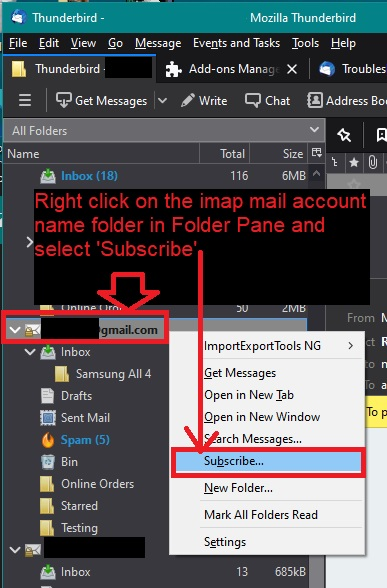
- Right click on the mail account name and select 'Subscribe'.
- click on 'Refresh'
- Select all server folders
- click on 'OK'
Thank you, By 'important' I meant my emails that were in my Inbox, and not in my trash folder. Brett
re : And finally, it appears that all the messages that did come over (both read and unread) are from my Trash or Deleted folders from my LSU account.
You say 'Trash or Deleted folders' - clarify please.
Some people have a folder called 'Trash' and some have a folder called 'Deleted' and some have a folder called 'Bin' and there are other variants, but all are the 'Trash' a place for unwanted mail that needs to be completely removed.
OR did you have some folders which you created for organising emails and decided to delete the folder and all it's contents.
It does seem odd to have 28,012 messages or more as you say some years do not appear, stored in the Trash. Trash is for unwanted mail. Generally cleared out on a regular basis eg: once a month. I would have expected you to have completely emptied the TRash before synchronising emails - why download stuff you do not want ?
OR did you move them out of TRash into the Inbox?
If it was a Pop account, then Thunderbird can only access the server Inbox and download what is in it into the pop account Inbox. So those emails in a Pop Inbox had to be in a server Inbox.
If it was an IMAP account, then each imap folder synchronises with server folder of same name and downloads whatever is in it. Imap is just a mirror copy of the server. It seems odd that you do not have many folders displaying especially for an imap account.
Please tell us what you see in this location:
- In 'Account Settings'
- Select 'Server Settings' for the account
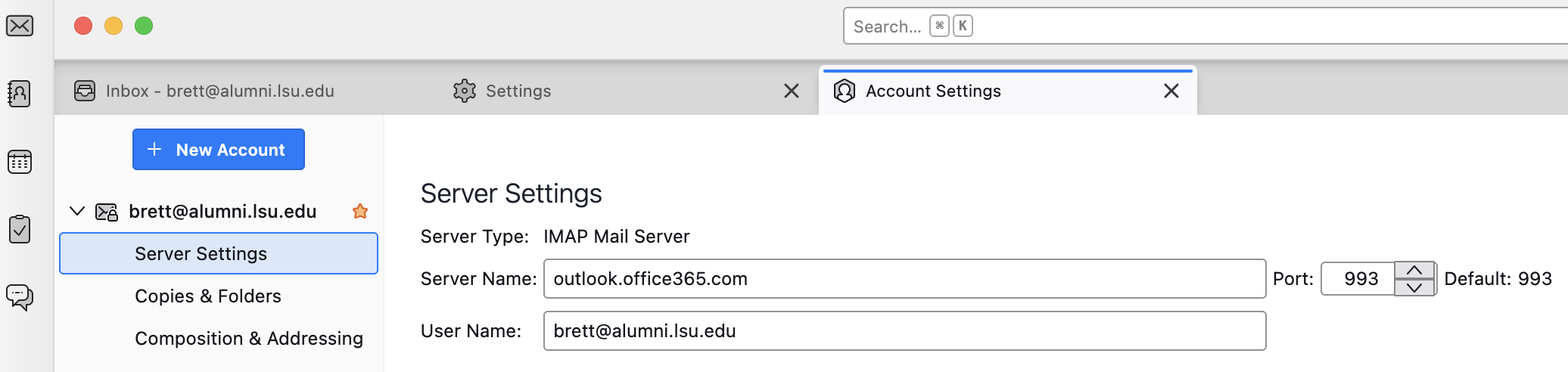
- On the right - 'Server type' does it say 'Pop Mail Server' OR 'Imap Mail server' ?
- You can always post an image if it helps.
How did you export your messages from LSUMail?
The Web tells me that LSU uses Microsoft 365. Did you export messages from Outlook to pst files? And then what? Or did the university create an export file for you? Or did you connect Thunderbird to your LSUMail account and copy or move messages within Thunderbird between accounts? At least some schools do not let people use third-party e-mail clients, so you may not have had that option. Or did you do something else?
Thank you, Toad-Hall, It is an Imap Mail server:
Hi Rick, I printed out the instructions provided by LSU to move my email messages to Thunderbird. I had my buddy follow these instructions, so I am not sure what he did exactly.
Thanks for info. You have an existing email address with LSU.edu. LSU.edu seem to use the Microsoft outlook.office365 server.
All the LSU emails are stored on the outlook.office365 server.
You probably have a Microsoft Account which you can use to access the webmail account of that email address via a browser.
In Thunderbird, You have an IMAP mail account for that email address and it's set up to access the emails stored on the outlook.office365 server. Those emails may be fully downloaded or just headers downloaded - we would need to check settings in order to be sure.
IMAP accounts should never be considered as independent from the server because they can only display whatever is on the server. Imap accounts are a mirror copy of what is on the server. If you access the webmail account and delete anything, then you will find those emails will auto be deleted from the Imap account.
re your comment "I recently migrated all my LSU.edu emails over to Thunderbird." You have not 'migrated' your emails to Thunderbird. Thunderbird is able to display your LSU emails by being allowed to access the stored emails on server. Providing you are downloading full copies of everything - we would need to check settings for this - then you can use Thunderbird to create a backup that is independent of server. You can also get 'Copies' of emails and put them in the 'Local Folders' account - that is independent of server and they are only stored on your computer.
As you have an IMAP account, you should be able to see a lot more folders.
- In Folder Pane
- Right click on the name of the imap mail account folder and select 'Subscribe' - see image below as guide
- Click on 'Refresh' button
- Select all the checkboxes for all the folders
- click on 'OK'