


All e-mails in my Inbox disappeared

I did Edit - Find - Search Messages and then Edit - Find- Global Search and searched for messages. Now all the e-mails in my Inbox disappeared. What can I do? Thank you.
Alla svar (20)
Did you activate the "Quick Filter" and then accidentally hit one of the buttons in the Quick Filter tool bar?
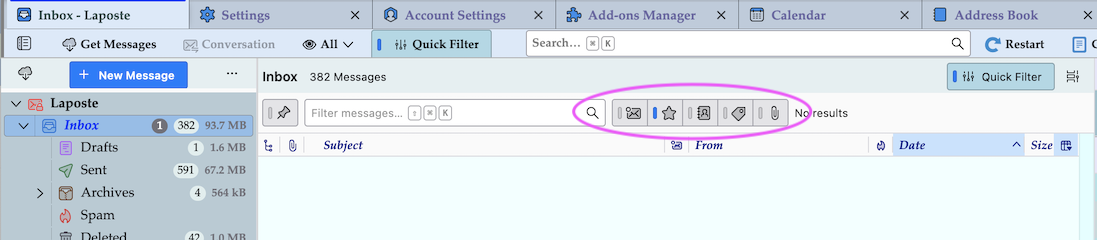
Thank you for your reply. I did not touch the "Quick Filter".
Is this a POP or an IMAP account? R-click on the Inbox folder > Properties > General: which is the number of messages and which is the size on disk?
Thank you for your reply. It is an IMAP account.
The size of the Inbox is 3.1 MB. Should I click on "Repair Folder"?
Yes, sometimes the folder index file gets damaged.
I right clicked on "Repair Folder". This has had no result.
If you right-clicked on "Repair Folder" button nothing will happen! You have to left-click on it...
I left clicked on the "Repair Folder" button.
Open a navigator like Firefox or some other, log in to the imap account on the webmail of your email address provider and verify if the Inbox folder is empty, too.
Thanks for your suggestion. I just did so. the Inbox of my e-mail provider is alas just as empty as that of my Thunderbird.
So I think that you mast have accidentally deleted your Inbox messages. Did you open the Trash folder of your account to verify if the messages are still there?
Yes, I opened the Trash folder. The messages were not there.
For the time being do not compact folders, even if Thunderbird prompts you to do. There still might be an opportunity to recover your deleted messages: download and install the Thunderbird add-on "Undelete" from the authors' home page https://www.ggbs.de/extensions/Undelete.html Then proceed as I explained in this thread in the MozillaZine forum https://forums.mozillazine.org/viewtopic.php?p=15020650#p15020650
The problem is that the instruction to not compact folders comes too late. Today I was prompted to do so. I did so.
I downloaded https://www.ggbs.de/extensions/Undelete.html with Chrome as Firefox had blocked it. Then I double clicked the file. I got the prompt "How do you want to open this file?". My computer could not find any suitable software. I reckon that I will have to download and install something.
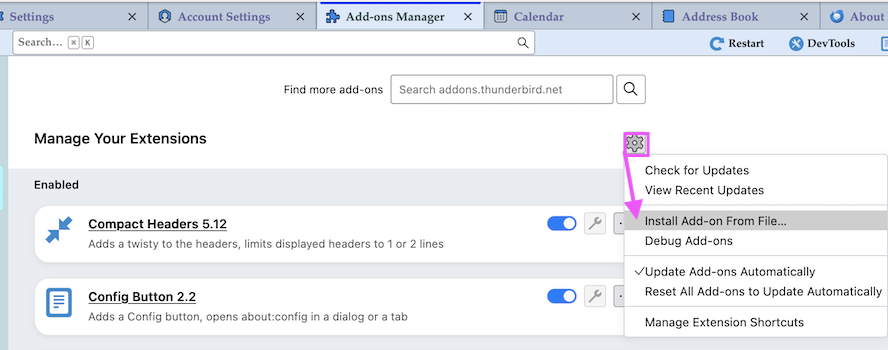
Since you have already compacted your folders it's too late now and the add-on "Undelete" is of no use. Having downloaded the "Undelete-current.xpi" install file you would have to open Thunderbird's Add-on Manager, click on the cogwheel symbol and choose " Install Add-on From File ..."

genie, do you have a back-up copy of your messages?
Thanks for your replies.
I do not have any back-up copy of my messages. Or rather I have one which is many months old.
I am confused on what I should do next.
genie said
Thanks for your replies. I do not have any back-up copy of my messages. Or rather I have one which is many months old. I am confused on what I should do next.
It seems that the messages are gone and cannot be recovered from anywhere, so you cannot do anything to bring them back.
Bur first, I would double-check: Are you sure that the account is an IMAP account? If you are not, check account settings > server settings.
Do you access this account from any other device?
A folder with 3.1 megabytes of data is not empty. Check the size of the inbox again by right clicking on it > select "Properties" > look at the right side of the "general information" section (tab). What is the size on disk? How many messages are reported in the folder?
I wonder what happened to your messages. Searches should certainly not delete messages. I can imagine that you intentionally or accidentally selected the messages in the results of the search that you did and accidentally pressed the <delete> key and that you have a preference set to delete messages immediately instead of moving them to the trash folder. That combination of accidents and settings seems improbable.
In your place, I would make back-up copies more regularly. (I do almost every day.) And check your setting in account settings > server settings to ensure that messages are moved to the trash folder when you "delete" them.
Thank you for your reply.
I intentionally created an IMAP account with Swissmail as I was having problems with the POP account.
When travelling I access my account with my tablet. But I have not done that for the past few weeks.
Now the Inbox has 12. MB and 78 messages. But all the messages are new, since I lost all the other ones. I have not found the one that I had before yesterday. As for the folder which I created and moved messages on to the other day, only to have them disappear the next day, it now has 5 messages and 609 kB. But these are messages that have been copied from elsewhere just to test it.
Do I need to save all my e-mails daily? How do I do that? Do I have to go to Settings - Account Settings and then what?
genie said
Do I need to save all my e-mails daily? How do I do that? Do I have to go to Settings - Account Settings and then what?
You should not have to back up your messages every day, but strange things happen, equipment fails, we make mistakes, applications have bugs, so the more often you back up, the more protected you are. Everyone has to pick a frequency that they are comfortable with.
You have options.
The best thing to do is to back up your whole drive regularly. Windows and Macintosh have tools for that.
You could also back up your Thunderbird profile regularly. There are at least two ways to do that. If your profile is less than two GB in size, you can use Thunderbird's export command under the "Tools" menu. That creates a zip file that Thunderbird can use to import later if it is needed. Or you could get the add-on ImportExportToolsNG and use it to back up your profile uncompressed.
There are probably other ways too.