


Blue highlights on new message

In my current version of Thunderbird, new messages show a dark blue subject line only until I click on them. After I open the message once, the blue highlight disappears. Is this the normal behavior now?
Is there any way to extend that same dark‑blue highlight to other emails as its really helpful to provide good contrast between individual emails.
Thanks, Steve
Alla svar (3)
here's my screenshot that you requested. you can see how this really distinguishes one email from another and is better than seeing the normal black on black
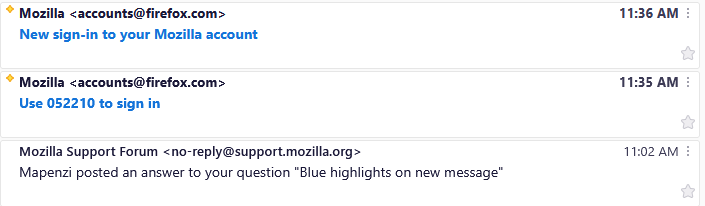
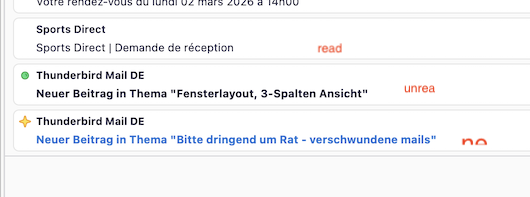
Oh yes, now I see that you use the cards view! Thanks for the screen shot. I am still a veteran Thunderbird user and have been staying with the table view. So I didn't imagine the blue subject line in new messages (and that's why I had profoundly modified my initial reply which concerned table view). The blue font colour plus the orange rhomb before the subject is the default display (or design) for new messages. As soon as you click on a new message the colour changes to black and font-weight to normal. If you don't click on new messages - leaving them unread - and restart Thunderbird (or change folders) those messages change status and become simple unread messages, identifiable by the green dot and bold black font. (first image) Back to your question to extend the blue highlight of the subject line to other messages: I don't know such a built-in feature. The only feature Thunderbird provides to distinguish or categorise messages are the message tags (important, work, personal, ......) . Yet in cards view those tags are very discreet, unlike tags in table view.
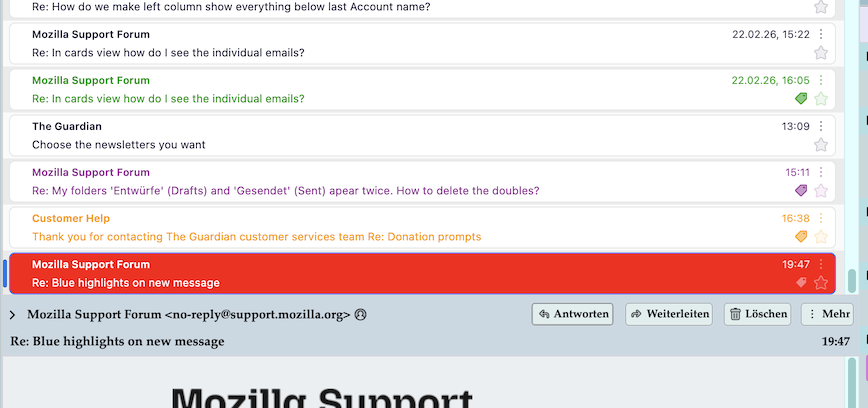
If you're going to use tag colours in cards view and want very apparent colours, you could do this using certain CSS codes in a userChrome.css file to be created in the profile folder. I join a screen shot showing different tagged mails discernable by their tag colours emphasised by my CSS codes
Ändrad av Mapenzi