


Windows 10 reached EOS (end of support) on October 14, 2025. If you are on Windows 10, see this article.

Sök i support

Akta dig för supportbedrägerier: Vi kommer aldrig att be dig att ringa eller skicka ett sms till ett telefonnummer eller dela personlig information. Rapportera misstänkt aktivitet med alternativet "Rapportera missbruk".

Läs mer

Local Folders seem to be invisible

  • 3 svar
  • 2 har detta problem
  • 110 visningar
  • Senaste svar av david

Hi there. I used the export/import functions to export my Thunderbird profile to a new computer.

It was largely successful. Many of my layout and general appearance settings were not imported to the new computer, but I just re-set those manually.

My last remaining problem is that it appeared that none of my local folders and messages were exported.

However, when I use file explorer to go to drive C on my new computer,

\Users\myname\AppData\Roaming\Thunderbird\Profiles\xxxxxxxxx.default-esr\Mail\Local Folders\Storage.sbd All of the folders, subfolders and messages are right there.

They're just not showing up in the directory tree pane or account pane (sorry, not sure what you really call it) in my main Thunderbird interface. All I see are "Trash" and "Outbox."

Anyone have any ideas as to how I make my local folders and messages re-appear?

Thanks,

Dave
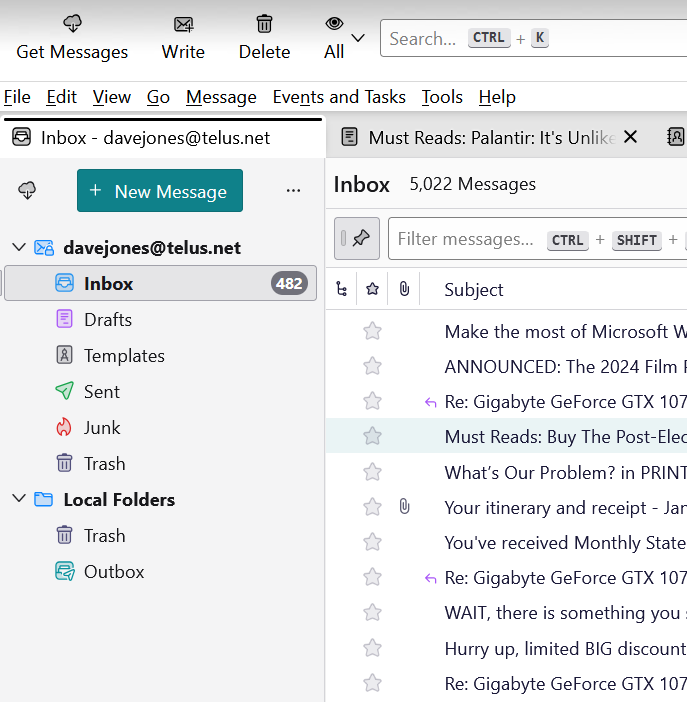
Hi there. I used the export/import functions to export my Thunderbird profile to a new computer. It was largely successful. Many of my layout and general appearance settings were not imported to the new computer, but I just re-set those manually. My last remaining problem is that it appeared that none of my local folders and messages were exported. However, when I use file explorer to go to drive C on my new computer, ''\Users\myname\AppData\Roaming\Thunderbird\Profiles\xxxxxxxxx.default-esr\Mail\Local Folders\Storage.sbd '' All of the folders, subfolders and messages are right there. They're just not showing up in the directory tree pane or account pane (sorry, not sure what you really call it) in my main Thunderbird interface. All I see are "Trash" and "Outbox." Anyone have any ideas as to how I make my local folders and messages re-appear? Thanks, Dave
Bifogade skärmdumpar

Vald lösning

Have you tried moving the entries from Storage.sbd to Local Folders and restarting Thunderbird?

Läs svaret i sitt sammanhang 👍 1

Alla svar (3)

Vald lösning

Have you tried moving the entries from Storage.sbd to Local Folders and restarting Thunderbird?

That did it! Thank you so much. Strange that in exporting my old profile, that Thunderbird moved the files to this odd and ineffective place.

You are very welcome. :)