

Windows 10 reached EOS (end of support) on October 14, 2025. If you are on Windows 10, see this article.

Sök i support

Akta dig för supportbedrägerier: Vi kommer aldrig att be dig att ringa eller skicka ett sms till ett telefonnummer eller dela personlig information. Rapportera misstänkt aktivitet med alternativet "Rapportera missbruk".

Läs mer
Denna tråd har arkiverats. Ställ en ny fråga om du behöver hjälp.
Löst Arkiverad

"private" startup switch no longer opens FF in private browsing mode

Figure8565

Hello,

For a long time, I was able to launch Firefox on Windows with the startup switch "-private" which would cause it to launch directly into private browsing mode. I used that in a few local scripts, and created a shortcut to the executable, with this path:

"C:\Program Files\Mozilla Firefox\firefox.exe -private"

Just like that, it worked. Whether by shortcut, terminal command, or execution of a 3rd party script, that startup switch would always open a private browsing window. Until a few months ago, that is, when it suddenly stopped working. Rather than opening a private browsing window, it now does one of two things:

1. If FF was not already running, it opens FF to a tab showing a warning that I am not in private browsing, with a button I can click to launch a private browsing window. (see attached image) This tells me it recognized the startup switch, but...refused to honor it? 2. If a FF window is already open, it launches another (non-private) Firefox window, with no warning about not being in Private Browsing mode.

Was this an intentional change? Is that startup switch just not supported anymore? I tried a quick web search, but all I was finding were unhelpful suggestions like "right click on the FF icon" and "pin to start." Not what I'm looking for.

Thank you!
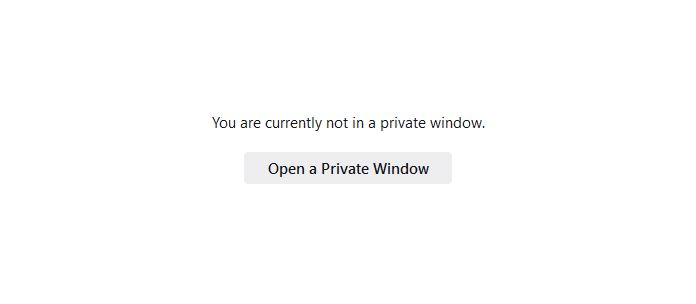
Hello, For a long time, I was able to launch Firefox on Windows with the startup switch "-private" which would cause it to launch directly into private browsing mode. I used that in a few local scripts, and created a shortcut to the executable, with this path: ''"C:\Program Files\Mozilla Firefox\firefox.exe -private"'' Just like that, it worked. Whether by shortcut, terminal command, or execution of a 3rd party script, that startup switch would always open a private browsing window. Until a few months ago, that is, when it suddenly stopped working. Rather than opening a private browsing window, it now does one of two things: 1. If FF was not already running, it opens FF to a tab showing a warning that I am not in private browsing, with a button I can click to launch a private browsing window. (see attached image) This tells me it recognized the startup switch, but...refused to honor it? 2. If a FF window is already open, it launches another (non-private) Firefox window, with no warning about not being in Private Browsing mode. Was this an intentional change? Is that startup switch just not supported anymore? I tried a quick web search, but all I was finding were unhelpful suggestions like "right click on the FF icon" and "pin to start." Not what I'm looking for. Thank you!
Bifogade skärmdumpar

Ändrad av Figure8565

Alla svar (2)

Vald lösning

Ah. So that startup switch has been deprecated, but "-private-window" replaces it. I tried swapping in that flag, and this looks to be working as I had expected, at least so far.

Thank you for the pointer!