


Windows 10 reached EOS (end of support) on October 14, 2025. If you are on Windows 10, see this article.

Sök i support

Akta dig för supportbedrägerier: Vi kommer aldrig att be dig att ringa eller skicka ett sms till ett telefonnummer eller dela personlig information. Rapportera misstänkt aktivitet med alternativet "Rapportera missbruk".

Läs mer
Denna tråd har arkiverats. Ställ en ny fråga om du behöver hjälp.
Arkiverad

How to revert to old style firefox inspect tool?

cor-el besvarat
Awaisome

Hi,

I am a developer. Firefox recently changed the way the Inspect tool highlights the element in question. Instead of a solid box will translucent fill for the content, padding and margin boxes, it only shows the outline of those boxes and it's very problematic to work with.

In the attachment I am highlighting the words "Shipping and Return Policy" and the light blue, purple and yellow outline represent the content, padding and margin boxes respectively.

How can I revert back to the old style where it shows the translucent boxes filled with respective colors instead of just the outlines.
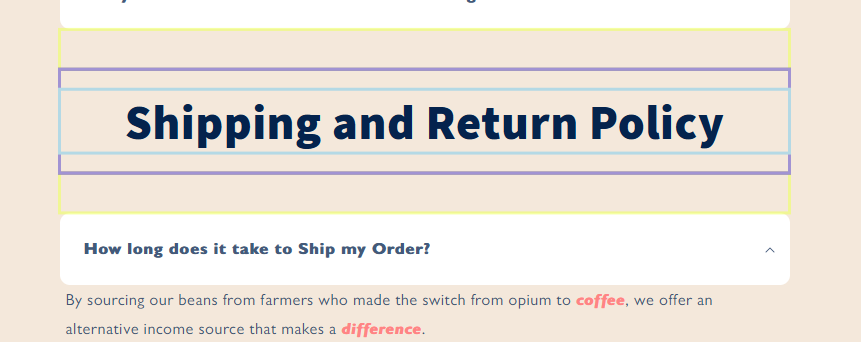
Hi, I am a developer. Firefox recently changed the way the Inspect tool highlights the element in question. Instead of a solid box will translucent fill for the content, padding and margin boxes, it only shows the outline of those boxes and it's very problematic to work with. In the attachment I am highlighting the words "Shipping and Return Policy" and the light blue, purple and yellow outline represent the content, padding and margin boxes respectively. How can I revert back to the old style where it shows the translucent boxes filled with respective colors instead of just the outlines.
Bifogade skärmdumpar

Alla svar (2)

You could try using userContent.css. The inspector is a chrome document.

https://support.mozilla.org/en-US/questions/1398699#answer-1552132

Maybe try the default System theme if you currently have another theme selected.

  • "3-bar" menu button or Tools -> Add-ons -> Themes