Windows 10 reached EOS (end of support) on October 14, 2025. If you are on Windows 10, see this article.

Sök i support

Akta dig för supportbedrägerier: Vi kommer aldrig att be dig att ringa eller skicka ett sms till ett telefonnummer eller dela personlig information. Rapportera misstänkt aktivitet med alternativet "Rapportera missbruk".

Läs mer

Assigning an email identity to a calendar to accept invitations

  • 1 svar
  • 1 har detta problem
  • 102 visningar
  • Senaste svar av sfhowes
  • Arkiverad

Hi, I keep getting prompts saying there are no writable calendars set up in Thunderbird (v 91.6.0 (32-bit)). So I select the calendar properties, as stated on this page: https://support.mozilla.org/en-US/kb/changing-calendar-preferences, but there's no option to assign the email address. Screenshot attached. So how can I assign an email address to a calendar to allow invitations to be added to it?

Thanks, Gareth.
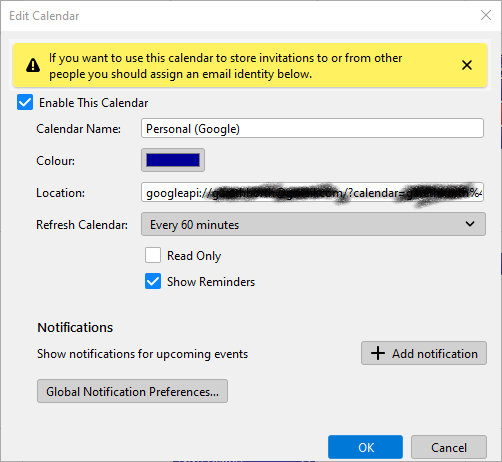
Hi, I keep getting prompts saying there are no writable calendars set up in Thunderbird (v 91.6.0 (32-bit)). So I select the calendar properties, as stated on this page: https://support.mozilla.org/en-US/kb/changing-calendar-preferences, but there's no option to assign the email address. Screenshot attached. So how can I assign an email address to a calendar to allow invitations to be added to it? Thanks, Gareth.
Bifogade skärmdumpar

Alla svar (1)

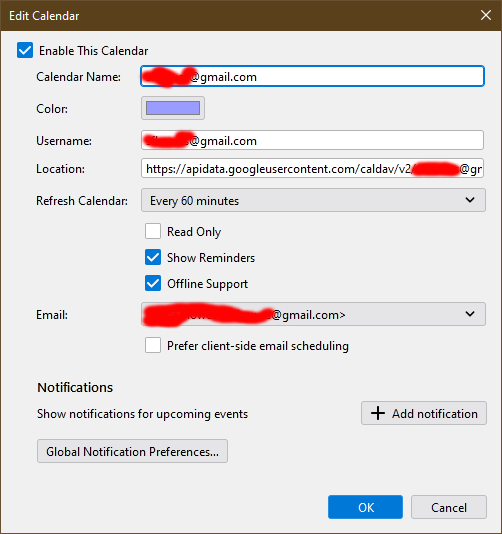
How did you add the Google calendar to TB? You must have entered a gmail account at some point. The attached picture shows the calendar Properties for my Google calendar, added directly without add-ons from File/New/Calendar...On the Network...enter the gmail account...calendars are autodetected...enter the account password in the OAuth2 window to allow access.