


Windows 10 reached EOS (end of support) on October 14, 2025. If you are on Windows 10, see this article.

Sök i support

Akta dig för supportbedrägerier: Vi kommer aldrig att be dig att ringa eller skicka ett sms till ett telefonnummer eller dela personlig information. Rapportera misstänkt aktivitet med alternativet "Rapportera missbruk".

Läs mer
Denna tråd har stängts och arkiverats. Ställ en ny fråga om du behöver hjälp.
Låst Arkiverad

Saving e-Mail

sfhowes besvarat
SuMo Bot

Recent Thunderbird update, 91.5.1 and maybe the previous, when I want to Save and e-Mail, Thunderbird gives an excessive name beginning with the e-Mail Subject, then the Sender's EMail Addree, then the Date. For 20-plus years my Netscape e-Mail, and then Thunderbird only gave the Subject as the initial file name. I am very very used to working with the Subject, only. Now I have to go into the e-Mail name and Delete the Sender's EMail Address and the Date. Is there a way to get the program to only save as the Subject line, without having to correct each and every e-Mail I want to save?

Recent Thunderbird update, 91.5.1 and maybe the previous, when I want to Save and e-Mail, Thunderbird gives an excessive name beginning with the e-Mail Subject, then the Sender's EMail Addree, then the Date. For 20-plus years my Netscape e-Mail, and then Thunderbird only gave the Subject as the initial file name. I am very very used to working with the Subject, only. Now I have to go into the e-Mail name and Delete the Sender's EMail Address and the Date. Is there a way to get the program to only save as the Subject line, without having to correct each and every e-Mail I want to save?

Alla svar (1)

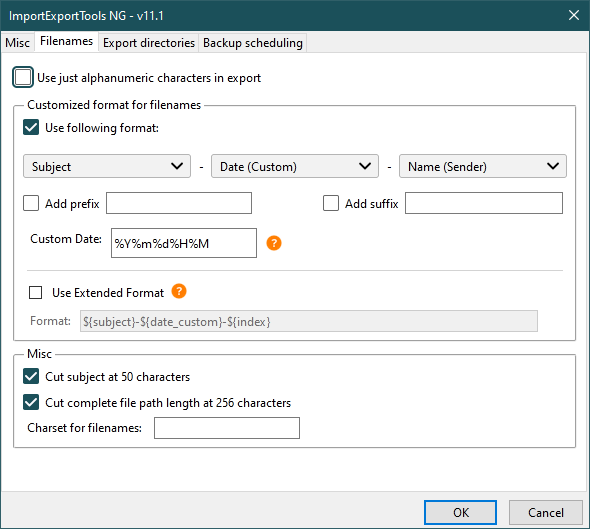
The ImportExportTools NG add-on allows custom filenames (see picture).
This question has been locked because the original author has deleted their account. While you can no longer post new replies, the existing content remains available for reference.