


Facebook Container

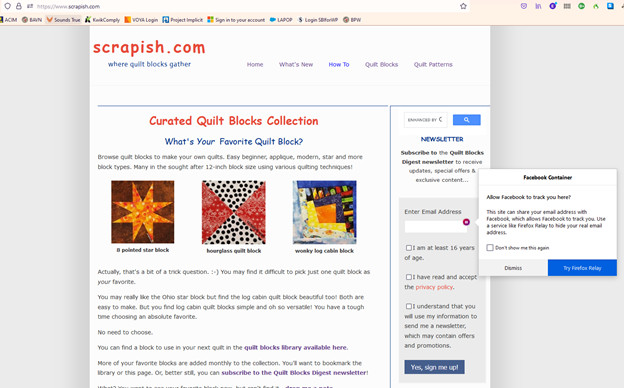
Firefox displays an icon for Facebook Container on my website's newsletter's form's email entry box. The more info states: "Allow Facebook to track you here?
This site can share your email address with Facebook, which allows Facebook to track you. Use a service like Firefox Relay to hide your real email address."
How do I get rid of this icon/service for Firefox Relay? It stops some people from signing up for my newsletter.
I do not display social media icons and do not offer social media sharing options except for a Pin It button for Pinterest on my website: https://www.scrapish.com/.
Alla svar (2)
Hi, that message comes from the fact that you have Facebook Container installed. It seems to trigger on any <input type="email"> even if there is no obvious connection to Facebook.
It looks like this was added recently and there is a complaint about it on the Issues list already:
https://github.com/mozilla/contain-facebook/issues/783
I think for now the only workaround might be to switch back to using <input type="text"> with a pattern to emulate the built-in validation of email inputs (from MDN):
<input type="text" pattern="^[a-zA-Z0-9.!#$%&'*+\/=?^_`{|}~-]+@[a-zA-Z0-9](?:[a-zA-Z0-9-]{0,61} [a-zA-Z0-9])?(?:\.[a-zA-Z0-9](?:[a-zA-Z0-9-]{0,61}[a-zA-Z0-9])?)*$">
That is not fail-safe validation, but since you also have server-side validation, it might be sufficient.

FOR everything glory to God amen
Ändrad av wakjiraadula6158