Windows 10 reached EOS (end of support) on October 14, 2025. If you are on Windows 10, see this article.

Sök i support

Akta dig för supportbedrägerier: Vi kommer aldrig att be dig att ringa eller skicka ett sms till ett telefonnummer eller dela personlig information. Rapportera misstänkt aktivitet med alternativet "Rapportera missbruk".

Läs mer

Delete default pre-filled account info

I have 3 accounts on a particular website. All three account login credentials are saved in firefox however one of them (the wrong one, since it is the one I use least often) is pre-filled when I first go to the site. How do I remove the setting that one of them is pre-filled? I want just the regular drop-down choice of all three. I have deleted that accounts credentials and cleared the cache, but as soon as I add the account info again, it is automatically pre-filled instead of just listed with the other two options.

I have 3 accounts on a particular website. All three account login credentials are saved in firefox however one of them (the wrong one, since it is the one I use least often) is pre-filled when I first go to the site. How do I remove the setting that one of them is pre-filled? I want just the regular drop-down choice of all three. I have deleted that accounts credentials and cleared the cache, but as soon as I add the account info again, it is automatically pre-filled instead of just listed with the other two options.

Ändrad av kbabberj

Alla svar (1)

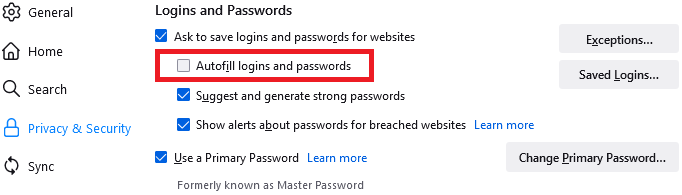
There is a general setting for whether to fill in credential versus not filling, but I don't know of a way to apply it to only one site.

For reference in case you want to try it (it's safer, actually), it's this checkbox on the Settings page: