


Thunderbird Not Sending lnserted Images

When I send email with an inserted image in Thunderbird ver. 78.7.1 (64-bit) the image is stripped from the message during send; if the image is sent only as an attachment, then it will arrive with the image displayed. This makes it difficult to compose a message with text and graphics interspersed. Is there a fix for this? OS is Ubuntu 20.10 (64-bit). Images I'm working with are relatively small jpgs (<200 kb). Thanks very much, Gene
Vald lösning
You may be composing in HTML mode but are you sending in HTML mode because it sounds like you are sending in Plain Text mode which does not allow formatting and so cannot display image, but usually attaches it instead.
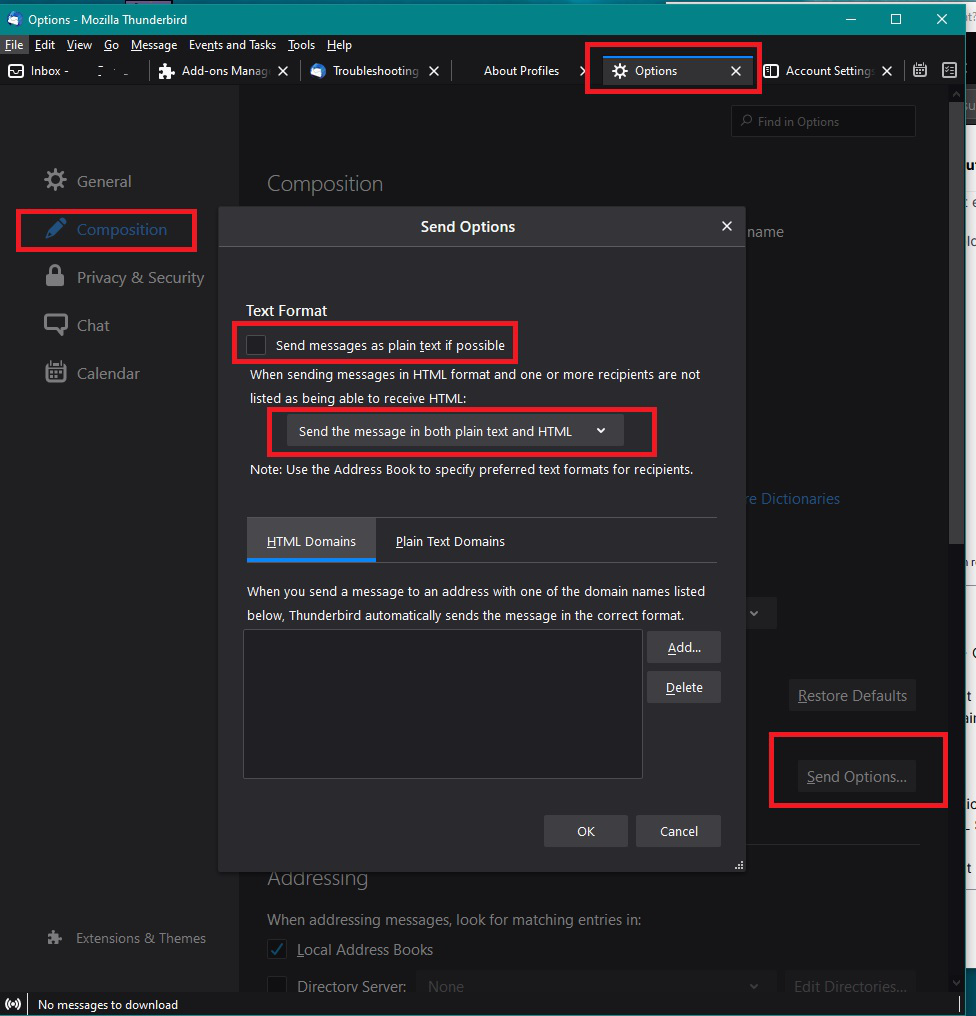
Edit > Preferences > Composition Under 'HTML Style' section click on 'Send Options' select 'Send the message in both plain text and HTML' see image as guide
Läs svaret i sitt sammanhang 👍 0Alla svar (2)
Vald lösning
You may be composing in HTML mode but are you sending in HTML mode because it sounds like you are sending in Plain Text mode which does not allow formatting and so cannot display image, but usually attaches it instead.
Edit > Preferences > Composition Under 'HTML Style' section click on 'Send Options' select 'Send the message in both plain text and HTML' see image as guide
Bingo! However it begs the question, "Why wasn't this setting used in the new installation of Thunderbird?" Thanks very much for your help, Gene