


Hot to get back Thunderbird 68 folder icons in Thunderbird 78?

Hey!
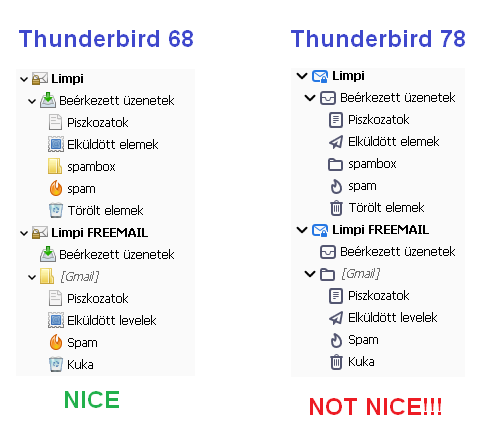
Thunderbird 78 has new folder icons. I find those much worse than the ones in Thunderbird 68. See: picture
I know I can give colors to simple forlders in Thunderbird 78, but they still look worse.
Can I get back my old Thunderbird 68 icons somehow in Thunderbird 78?
Vald lösning
go to the addons in the menu and search for Phoenity Icons
It will offer you the option to install this https://addons.thunderbird.net/en-US/thunderbird/addon/phoenity-icons/?src=ss
You might want to look at some of the other addons by the same author. https://addons.thunderbird.net/en-US/thunderbird/user/dillinger/
Läs svaret i sitt sammanhang 👍 1Alla svar (6)
Vald lösning
go to the addons in the menu and search for Phoenity Icons
It will offer you the option to install this https://addons.thunderbird.net/en-US/thunderbird/addon/phoenity-icons/?src=ss
You might want to look at some of the other addons by the same author. https://addons.thunderbird.net/en-US/thunderbird/user/dillinger/
Thank you! :)
1. The new TB78 icons decrease my ability to efficiently and effectively file my emails in TB. Even though I can change the line color of the folder, it doesn't help much at all. We need the ability to fill in the entire icon with color as we did with "Colored Folders". The colored outline is a highly non-optimal GUI.
2. I loaded the Phoenity Icons but was unable to change the icon color. Having the folders back is a good initial start. I need to be able to color code the Phoenity icons for the app to be fully useful. I tried unsuccessfully to color-code the Phoenity Icons using TB 78 "properties". Maybe I'm trying something that doesn't yet exist. Thoughts?
Thanks in advance for considering my comments.
@takitus If the above information does not resolve your issue, you should consider new creating a new thread with specific details about your issue. I just installed the addon and all the icons immediately change to colour. Not my personal choices, I think worse than the black and white. But they do change to colour.
Doing so will allow support forum volunteers to give you solutions that are more helpful to you. See the Mozilla Support rules and guidelines for more information about posting support requests.
Please, feel free to post the link to your thread on this thread for volunteers interested in assisting you.
Thank you.

By the way, as of now, Phoenity Icons does not work with 78.4.

Hi everyone, Matt's post was marked as the solution by the person who asked the original question (Limpi). Your issue may have similar symptoms, but it is likely a different cause/solution. For better help, it would be best to use https://support.mozilla.org/en-US/questions/new where volunteers can get more details about your setup.
Because this thread is solved and more people might start using it for their own questions, I'm going to lock it.