

Windows 10 reached EOS (end of support) on October 14, 2025. If you are on Windows 10, see this article.

Sök i support

Akta dig för supportbedrägerier: Vi kommer aldrig att be dig att ringa eller skicka ett sms till ett telefonnummer eller dela personlig information. Rapportera misstänkt aktivitet med alternativet "Rapportera missbruk".

Läs mer
Denna tråd har arkiverats. Ställ en ny fråga om du behöver hjälp.
Arkiverad

Can you Import MBOX to an IMAP Account

sperber.david

I am looking to import an MBOX (gmail takeout file) to a new Gmail account. I ultimately want to get the contents of the MBOX saved on Gmail's cloud for the new account. I have the new account set up with IMAP enabled. I run into an issue with import export tools and have attached a screenshot below. Is this possible to do with import export tools for an account set up that way. If not, how can I get the MBOX saved locally onto this new Gmail account with it ultimately saved on Google's servers. Thank you so much for your help!
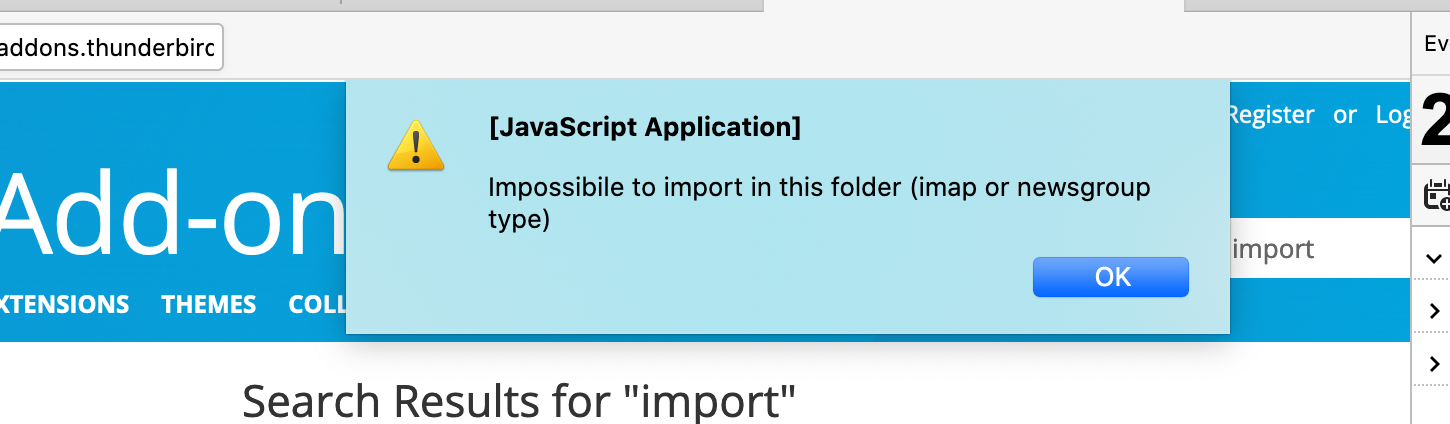
I am looking to import an MBOX (gmail takeout file) to a new Gmail account. I ultimately want to get the contents of the MBOX saved on Gmail's cloud for the new account. I have the new account set up with IMAP enabled. I run into an issue with import export tools and have attached a screenshot below. Is this possible to do with import export tools for an account set up that way. If not, how can I get the MBOX saved locally onto this new Gmail account with it ultimately saved on Google's servers. Thank you so much for your help!
Bifogade skärmdumpar

Alla svar (1)

Answered here: https://support.mozilla.org/en-US/questions/1285736#answer-1352454

To import a takeout mbox, remove the .mbox extension so the file has no extension, Help/Troubleshooting, Profile Folder, Show in Finder, close TB, copy the mbox file into Mail\Local Folders, restart TB.