


Windows 10 reached EOS (end of support) on October 14, 2025. If you are on Windows 10, see this article.

Sök i support

Akta dig för supportbedrägerier: Vi kommer aldrig att be dig att ringa eller skicka ett sms till ett telefonnummer eller dela personlig information. Rapportera misstänkt aktivitet med alternativet "Rapportera missbruk".

Läs mer

How to safely remove older version of Thunderbird, and set latest version as default.

  • 1 svar
  • 1 har detta problem
  • 90 visningar
  • Senaste svar av Stans

I currently have both version 68.7 and version 68.3 installed on my computer (Ubuntu 19.04). I can access the newer version from the executable in the installation directory saved to to my home directory. But, all other executables seem to point to the older version, which is a problem because trying to run the older version forces you to create a new default profile, which will then override the default profile in version 68.7, as seen in the screenshotted prompt below. So, how can I make all executable files point to only the latest installation/profile?
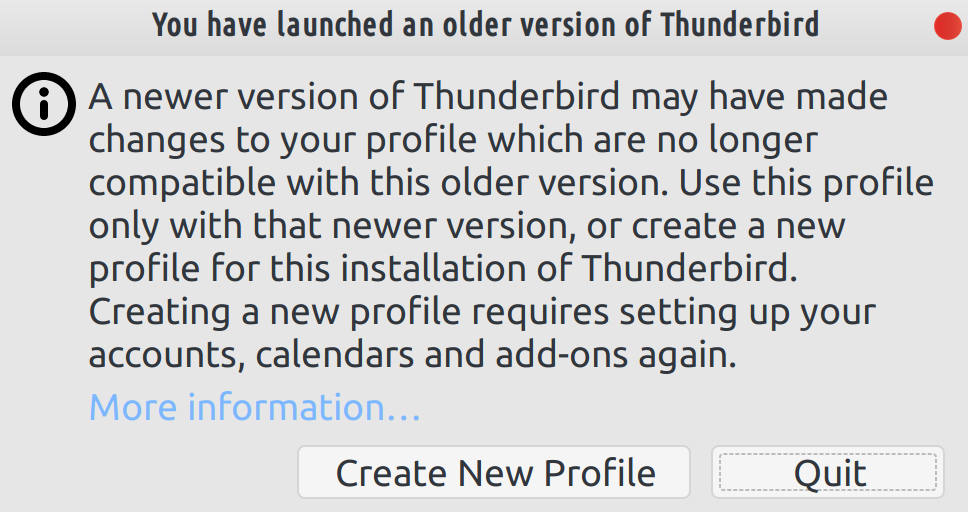
I currently have both version 68.7 and version 68.3 installed on my computer (Ubuntu 19.04). I can access the newer version from the executable in the installation directory saved to to my home directory. But, all other executables seem to point to the older version, which is a problem because trying to run the older version forces you to create a new default profile, which will then override the default profile in version 68.7, as seen in the screenshotted prompt below. So, how can I make all executable files point to only the latest installation/profile?
Bifogade skärmdumpar

Vald lösning

If you installed the older version using the package manager in Ubuntu, then simply use it to uninstall Tbird.

Läs svaret i sitt sammanhang 👍 0

Alla svar (1)

Vald lösning

If you installed the older version using the package manager in Ubuntu, then simply use it to uninstall Tbird.