


Windows 10 reached EOS (end of support) on October 14, 2025. If you are on Windows 10, see this article.

Sök i support

Akta dig för supportbedrägerier: Vi kommer aldrig att be dig att ringa eller skicka ett sms till ett telefonnummer eller dela personlig information. Rapportera misstänkt aktivitet med alternativet "Rapportera missbruk".

Läs mer
Denna tråd har arkiverats. Ställ en ny fråga om du behöver hjälp.
Löst Arkiverad

Remove "reply-to" line when composing a new email

Queenmab100 besvarat
Queenmab100

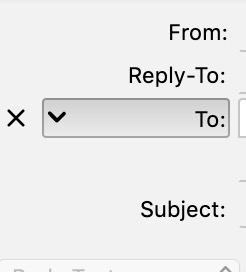
When I compose a new email in TB, I see the following lines:

From: [my name] Reply-To: [my email address] To:

Subject:

I have attached a screenshot below. How do I get rid of the line that is labeled "Reply-To"? It's not necessary that it be there and it is *bugging* me. If I hover over that line, an 'x; appears to the left of it and when I click on the 'x', the 'Reply-To' line goes away. But when I go to compose my next email, it's there again. How do I get rid of it permanently?

Thanks for your help.
When I compose a new email in TB, I see the following lines: From: [my name] Reply-To: [my email address] To: Subject: I have attached a screenshot below. How do I get rid of the line that is labeled "Reply-To"? It's not necessary that it be there and it is *bugging* me. If I hover over that line, an 'x; appears to the left of it and when I click on the 'x', the 'Reply-To' line goes away. But when I go to compose my next email, it's there again. How do I get rid of it permanently? Thanks for your help.
Bifogade skärmdumpar

Alla svar (2)

Vald lösning

Reply-To only appears if you have a Reply-to Address for the account. Tools/Account Settings, select the account in the left pane, see the Reply-to Address in the right pane.

Thank you! I knew it was there somewhere but couldn't find it. You gave me the key!