


intermittent failure to connect to my outlook email account when sending an email

(happens on 4 different .msn email accounts on 4 different win10 pro systems).
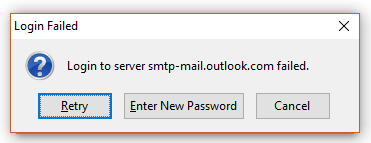
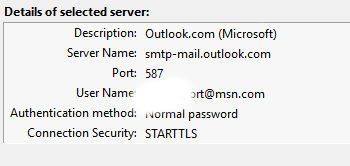
the problem seems to be with outlook. when i send a message, OCCASIONALLY i get an error message - "login failed" (see the screenshots). it happens several times, but if i keep trying eventually i can get it to connect. it happens about 10-15% of the time and on 4 different win10 pro systems. it happens with 4 different msn.com email accounts, but never with 4 different gmail.com accounts or 3 q.com accounts. i get no useful help (3 hours being turfed) from the mircosoft and the outlook support people. they say it's up to thunderbird to help...

Ändrad av cybersailer
Vald lösning
if you have an anti virus (internet security suite) scanning outgoing mail, you might want to turn that off. Or mail scanning in it's entirety. Anti virus is often the source of sending mail issues. or in the case of products with firewalls, accessing the internet to do anything at all.
Alla svar (6)
I have seen an ongoing raft of issues with that particular Microsoft Offering.
In your outlook web settings are your Microsoft approved SMTP settings.
Hopefully this URL will take you there into the pop and IMAP settings at outlook.com. https://outlook.live.com/mail/#/options/mail/accounts
I just looked at my setting on the web site and they have changed the server name to be used. They now present me with;
Server name: smtp.office365.com Port: 587 Encryption method: STARTTLS
thank you, matt.
in a nutshell, microsoft and outlook have not been helpful, so i've been fiddling with my settings and i think i figured it out (we'll see since it is intermittent). when i go to the approved settings site, they show: Server name: smtp.live.com Port: 587 Encryption method: SSL/TLS required
i tried this and it still didn't work, so i changed the latter to STARTTLS which is what i had been using and now it seems to work. SO the only real change is in the SERVER NAME from smtp-mail.outlook.com to smtp.live.com
why couldn't they tell me this?
i will leave this open for a couple days, and if it continues to work correctly, i will post that and close the question
well that failed. so i changed the server name again.
now (as you suggested) SERVER NAME now smtp.office365.com
this change worked, but i will leave this a couple days (or less)
thanks again
Ändrad av cybersailer
Vald lösning
if you have an anti virus (internet security suite) scanning outgoing mail, you might want to turn that off. Or mail scanning in it's entirety. Anti virus is often the source of sending mail issues. or in the case of products with firewalls, accessing the internet to do anything at all.
well this didn't work, either.
SERVER NAME now smtp.office365.com
next attempt will be to turn off virus checking on email. but i don't understand why an email message would not got through on several attempts and then the same one would login and deliver just fine a few minutes later with no changes to content or settings...
Ändrad av cybersailer
turned off kaspersky email virus checking.
SERVER NAME: smtp.office365.com
now seems to be working consistently. stay tuned...
LATER:
TURNING OFF KASPERSKY EMAIL VIRUS CHECKING SOLVED THE PROBLEM
Ändrad av cybersailer