


Change location of right-click (context) menu so it doesn't cover up what I want to click on in the web page?

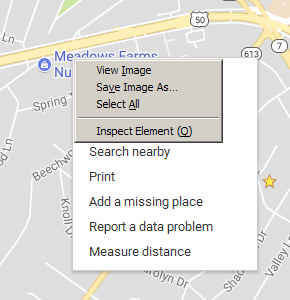
I love the context (right-click) menu except for one thing. Some web pages use right-click to bring up a menu of their own, and this gets covered up by the Firefox right-click menu. One example is right-clicking on a point in Google Maps to bring up the Google Maps menu which includes "Measure distance."
Is there a way to make the Firefox context menu pop up someplace else, or go away without also closing the web page's pop-up menu?
I love the context (right-click) menu except for one thing. Some web pages use right-click to bring up a menu of their own, and this gets covered up by the Firefox right-click menu. One example is right-clicking on a point in Google Maps to bring up the Google Maps menu which includes "Measure distance."
Is there a way to make the Firefox context menu pop up someplace else, or go away without also closing the web page's pop-up menu?
Vald lösning
You can press the ESC key to close the Firefox context menu.
Läs svaret i sitt sammanhang 👍 5Alla svar (2)
Vald lösning
You can press the ESC key to close the Firefox context menu.
cor-el said
You can press the ESC key to close the Firefox context menu.
Gee, why didn't I think of that? I'm sure I must have tried that, but I tried it just now and it did what I wanted.
Thanks