


create eml file and trigger a script using filtaquilla

I want to create an eml file for certain incoming messages (ones that match criteria based on the subject content.) The forum post at https://support.mozilla.org/en-US/questions/1116462 suggests using FiltaQuilla for creating the eml file. I've looked at the FiltaQuilla preferences screen https://addons.cdn.mozilla.net/user-media/previews/full/39/39452.png?modified=1331218902. Which of the FiltaQuilla actions will write the file?

I also want to trigger a script, based on the same criteria, to read the eml file. What is the difference between launch file and run file? Will either one execute my script? What is the calling syntax?
TIA.
Vald lösning
did you download FQ and then install it from add-ons / "gear" / install add-on from file ? You should have it listed in add-ons. FQ-Option let you select what you want to see as choices in filter.
Homepage; http://mesquilla.com/extensions/filtaquilla/
Läs svaret i sitt sammanhang 👍 0Alla svar (5)
to make a file see images
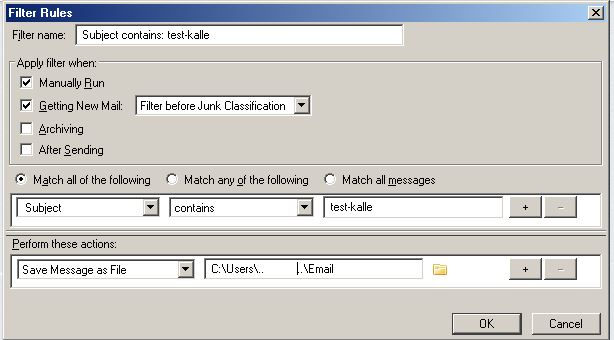
run a file is for executables [exe, cmd, bat ....] launch would open a specified file (like .eml) If you know its name. Whenever you run the make-filter the name would be the "subject-line"+ a number and .eml. If you just name the directory without a filename explorer will launch and show that directory then you can open any file with a double-click
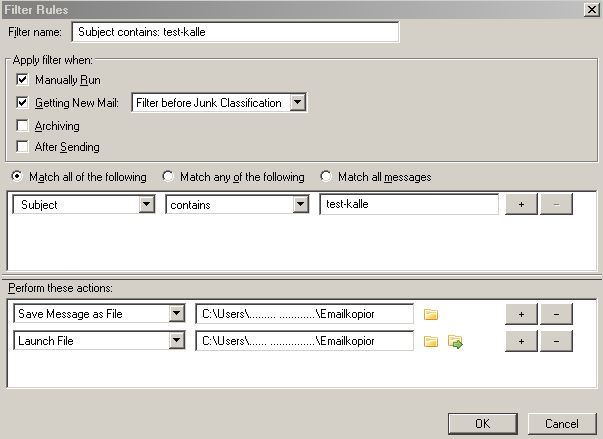
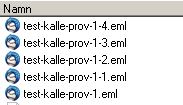
gnospen, thanks for your reply.
I installed FQ. It gave no errors or feedback that the install was successful or not. So I don't know whether it actually installed. I exited TB and restarted. Got a message that TB had crashed. Then, apparently, TB restarted again on its own. I sent a crash report.
If it did actually install, how would I navigate to it?
I'm running TB 45.1.1.
Any thoughts on how I should proceed?
Vald lösning
did you download FQ and then install it from add-ons / "gear" / install add-on from file ? You should have it listed in add-ons. FQ-Option let you select what you want to see as choices in filter.
Ändrad av Gnospen
I did download and then install using the install add-ons from file, but I did not know to navigate to the list of add-ons and would not have guessed to look in options. In other words, I am/was pretty much clueless! Thanks to your help, I think I can start experimenting. The homepage appears very helpful too.
I'll mark this as solved and probably come back with new questions generated by my experimentation.
4am here so time to get some sleep.