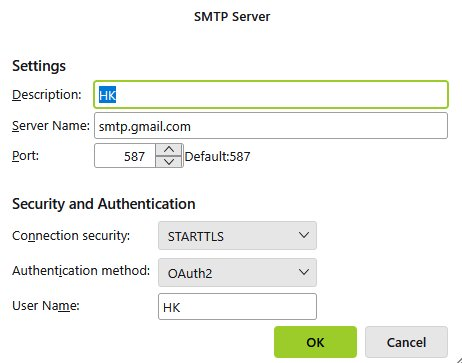
After the last Thunderbird update I cannot send e-mails but still receive emails as usual. When sending I get a error message Must issue a STARTTLS command but all settings seems to be OK

Thunderbird Send message Error Sending of the message failed An error occurred while sending mail. The mail server responded: Must issue a STARTTLS command first. For more info, go to https://support.google.com/a/answer/3221692 and review RFC 3207 specifications. ffacd0b85a97d-47aa0f2186bsm33992962f8f.36 -gsmtp. Please verify that your email address is correct in your account settings and try again.
Note: I could not find the suggested specifications as indicated in the error message!
I did not change anything, the sending error occurred suddenly , all my settings IMAP Mail Server Port 993 SSL/TLS OAuth2 and SMTP Port 465 are still set to default. I changed also the SMTP to an new shown default 587 but non of this settings resolved the problem
Všetky odpovede (2)
Please post a screenshot of the SMTP server settings pane. That may prove helpful. The error message indicates it should be set to STARTTLS.
Hi David Enclosed is the screen shot of my last attempt you have requested. emails can be received but still not be sent
Heinz