


Windows 10 reached EOS (end of support) on October 14, 2025. If you are on Windows 10, see this article.

Vyhľadajte odpoveď

Vyhnite sa podvodom s podporou. Nikdy vás nebudeme žiadať, aby ste zavolali alebo poslali SMS na telefónne číslo alebo zdieľali osobné informácie. Nahláste prosím podozrivú aktivitu použitím voľby “Nahlásiť zneužitie”.

Ďalšie informácie

Firefox appearance is custom and doesn't match system theme and widget set

  • 1 odpoveď
  • 0 má tento problém
  • 197 zobrazení
  • Posledná odpoveď od Paul

I'm using Ubuntu 24 with the XFCE desktop. I'm installing the debs straight off packages.mozilla.org (currently 143.0.3).

Firefox's title bar, and window manager buttons do not have the same look and feel as the rest of my windows. And I have no idea where they're coming from.

They do change appearance in response to picking the different styles in Settings > Appearance, but the changes appear to be limited to colors only. The minimize, maximize and close buttons look differently than on all other windows, and they are more spread out than in, and the shade button is nowhere to be found.

I'm attaching two small images, the first one is the standard set of widgets all other windows have, and the second one is Firefox's odd duck. I could not find anything in settings. "Extensions And Themes" shows that "System theme" is enabled. Well, it's coming up a bit short...
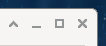
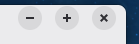
I'm using Ubuntu 24 with the XFCE desktop. I'm installing the debs straight off packages.mozilla.org (currently 143.0.3). Firefox's title bar, and window manager buttons do not have the same look and feel as the rest of my windows. And I have no idea where they're coming from. They do change appearance in response to picking the different styles in Settings > Appearance, but the changes appear to be limited to colors only. The minimize, maximize and close buttons look differently than on all other windows, and they are more spread out than in, and the shade button is nowhere to be found. I'm attaching two small images, the first one is the standard set of widgets all other windows have, and the second one is Firefox's odd duck. I could not find anything in settings. "Extensions And Themes" shows that "System theme" is enabled. Well, it's coming up a bit short...
Priložené obrázky

Vybrané riešenie

Hi Sam

This support article should help:

https://support.mozilla.org/en-US/kb/customize-firefox-controls-buttons-and-toolbars#firefox:linux:fx143

Select the "Titlebar" option in the bottom left of the "Customise" screen.

Čítať túto odpoveď v kontexte 👍 0

Všetky odpovede (1)

Vybrané riešenie

Hi Sam

This support article should help:

https://support.mozilla.org/en-US/kb/customize-firefox-controls-buttons-and-toolbars#firefox:linux:fx143

Select the "Titlebar" option in the bottom left of the "Customise" screen.

Položiť otázku

Ak chcete odpovedať na príspevky, musíte sa prihlásiť do svojho účtu. Ak ešte nemáte účet, položte novú otázku.