


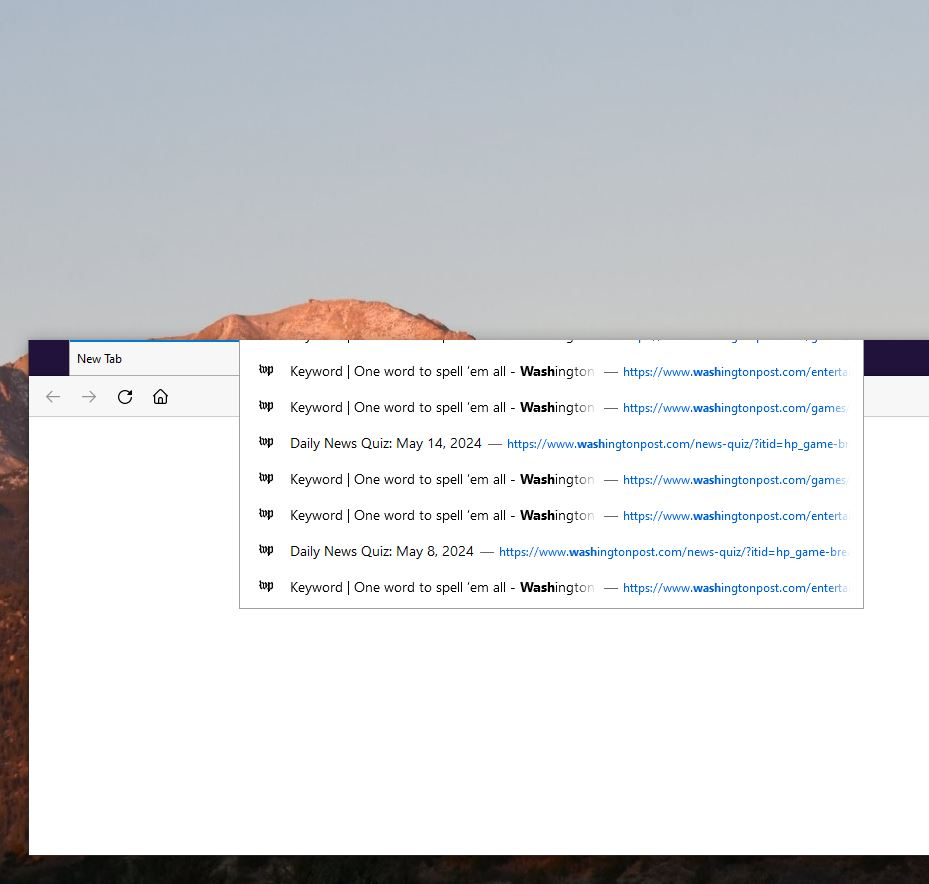
Top of url dropdown is cut off

I just updated to the latest version of Windows 10, and now when using Firefox (126.0), the url dropdown menu rather than dropping down now "floats" over the browser window with the top cut off. The top url is still there, and I can navigate to it using the arrow keys, but it doesn't show. This is new as of this morning, when Windows updated. No issue in other browsers.
Vybrané riešenie
Go to about:config and turn off toolkit.legacyUserProfileCustomizations.stylesheets preference.
Čítať túto odpoveď v kontexte 👍 3Všetky odpovede (6)
Do you use any custom userChrome.css file?
I think I might, but if I do, it was a while ago. How can I check?
It may be listed on 'about:support' page under Legacy User Stylesheets.
This is what's showing up there:
Active true Stylesheets userChrome.css
Vybrané riešenie
Go to about:config and turn off toolkit.legacyUserProfileCustomizations.stylesheets preference.
That fixed it! I had a stylesheet that got rid of floating tabs. I'll look and see if there's a new one that doesn't mess up the dropdown, but if not, at least the dropdown works. Thank you for your help!