


Can no longer "Sign in with Google"
(This issue has been happening for several months, perhaps even a year or more)
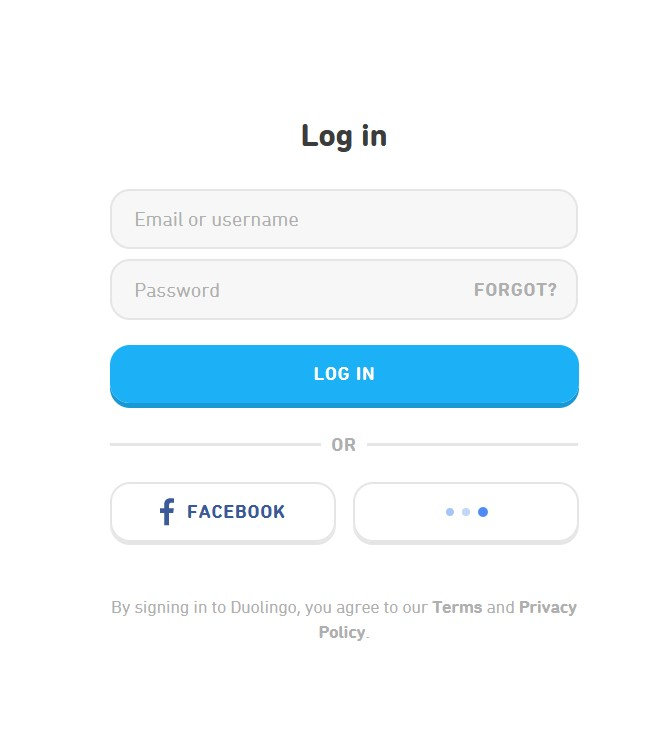
My issue's example is me trying to log in to Duolingo. When I try to log in with google, a popup appears where I select which google account to use, the popup closes, and then the sign in button loads perpetually. I left it to load for over an hour and nothing happened.
I tried the same thing with Microsoft Edge and I could log in with google perfectly fine.
This has happened to me on other websites too, but the issue is worse with Duolingo because if you have a google account associated with Duolingo, it requires you to log in with google. I can't use my password to log in, so I can't use Duolingo on Firefox
Upravil(a) ella dňa
Všetky odpovede (5)

Make sure you are not blocking content.
https://support.mozilla.org/en-US/kb/enhanced-tracking-protection-firefox-desktop also see https://blog.mozilla.org/security/2021/03/23/introducing-smartblock/
https://support.mozilla.org/en-US/kb/smartblock-enhanced-tracking-protection
Diagnose Firefox issues using Troubleshoot(Safe) Mode {web link}
A small dialog should appear. Click Start In Troubleshoot(Safe) Mode (not Refresh). Is the problem still there?
Many site issues can be caused by corrupt cookies or cache.
Warning ! ! This will log you out of sites you're logged in to. You may also lose any settings for that website.
- How to clear the Firefox cache {web link}
Google and Firefox have been having issues of late. Check out: https://support.mozilla.org/en-US/questions/1376747#answer-1504303
Tried turning off Enhanced Tracking Protection and the issue still persists.
So it's an issue with Firefox that's existed for at least a year? That's so fun. Not your fault, sorry for being snippy. This is really irritating
I was able to replicate the issue in Linux. I click on Google Login and nothing happens, even in Troubleshoot mode.