


"Pinned" or "Frequent" links when clicked on are taking forever to open. That's not normal. How to fix?

This is happening more often lately...I'll attempt to access frequent links from the lists and it can take several minutes before the link opens. I can access the links sooner by just typing the link into the address bar and pushing enter. In the past clicking the links from the list brought the site up immediately...
How can I remedy the situation?
Thanks!
Všetky odpovede (2)
Hello,
Try Firefox Safe Mode to see if the problem goes away. Firefox Safe Mode is a troubleshooting mode that temporarily turns off hardware acceleration, resets some settings, and disables add-ons (extensions and themes).
If Firefox is open, you can restart in Firefox Safe Mode from the Help menu:
- Click the menu button
 , click Help
  and select Restart with Add-ons Disabled.
If Firefox is not running, you can start Firefox in Safe Mode as follows:
- On Windows: Hold the Shift key when you open the Firefox desktop or Start menu shortcut.
- On Mac: Hold the option key while starting Firefox.
- On Linux: Quit Firefox, go to your Terminal and run firefox -safe-mode
(you may need to specify the Firefox installation path e.g. /usr/lib/firefox)
When the Firefox Safe Mode window appears, select "Start in Safe Mode".
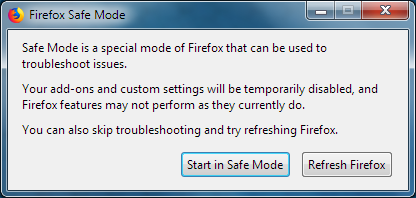
If the issue is not present in Firefox Safe Mode, your problem is probably caused by an extension, theme, or hardware acceleration. Please follow the steps in the Troubleshoot extensions, themes and hardware acceleration issues to solve common Firefox problems article to find the cause.
To exit Firefox Safe Mode, just close Firefox and wait a few seconds before opening Firefox for normal use again.
When you figure out what's causing your issues, please let us know. It might help others with the same problem.
Hi,
Thanks for the suggestion, but it didn't work...
Sometimes, the "pinned" and "frequent" links open right up when I click on them. In fact, for the past few days that has been the case. However, today, it's taking several minutes. FYI, the only window I have open is Firefox. I'm not certain why this is happening.