Why you need me to sign with mozilla
I need the answer why you command me to sign with mozilla account in order to get what or what going on
Open


I need the answer why you command me to sign with mozilla account in order to get what or what going on
Has anybody else experienced a similar problem? Or can you help me trouble shoot this issue please? I'm busy playing audio in a tab of the browser. The sound quality is g… (read more)
Has anybody else experienced a similar problem? Or can you help me trouble shoot this issue please?
I'm busy playing audio in a tab of the browser. The sound quality is good (rich, full, deep). Next, I open a new window by any means (Ctrl+N / Open link in new window / Menu > New window) As the new window appears, the current audio playback becomes tinny / lower quality. After a 3 seconds, the normal good sound quality starts again.
I'm currently using Bluetooth connected headphones and this happens on different headphones. I have to find some wired headphones first before I can try that. This happens with every new window that I open, regardless of the number of open tabs in current windows or how many previous open windows I already have. This happens regadless if audio enhancements of the output device are enabled or not. Spatial sound is set to off. Windows is set to 'do nothing' & will not adjust the volumes of different sounds when I'm using my PC to place or receive telephone calls.
OS: Windows 11 with latest patches Firefox: latest & older builds Hardware drivers: All manufacturer drivers applied
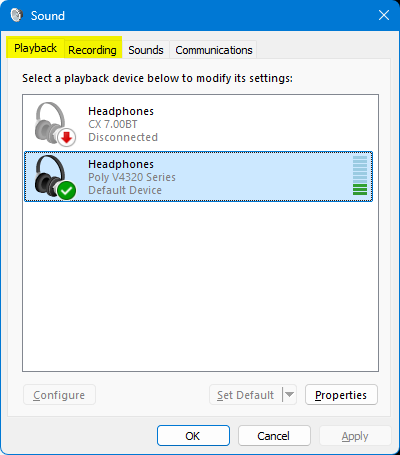
PS I can replicate this issue by changing between the 'Playback' & 'Recording' tab in the Sound Control Panel applet. That is to say, the same decrease in audio quality happens when I change from the Playback tab to the Recording tab. Audio quality improves again when I change from the Recording tab to the Playback tab https://assets-prod.sumo.prod.webservices.mozgcp.net/media/uploads/images/2026-09-12-15-38-23-1accad.png
PPS My new windows are set to open on 'about:support'
PPPS Can't reply to previously archived question : https://support.mozilla.org/en-US/questions/1525613
Pueden ayudar en quitar los anuncios y mejor la calidad de videos
I'm using Mozilla's Firefox Debian package, Firefox 155.0.1 (64-bit), on a desktop. Until this version, my compose key worked with no problem, in Firefox and all other a… (read more)
I'm using Mozilla's Firefox Debian package, Firefox 155.0.1 (64-bit), on a desktop. Until this version, my compose key worked with no problem, in Firefox and all other applications. Now it works with all other applications, but not Firefox.
My .bashrc includes this line: export GTK_IM_MODULE=xim
I checked about:config, and focusmanager.testmode is set to false.
Any ideas? I can't type my name without the compose key...
I know there the little tab for location but it's stuck on Recommended. And I can't click on it to change it.
I've searched through apple support and can't find how to show images using Firefox on my iPhone 16 iOS 26.6.2. MacOS works fine.
Здравствуйте.У меня из вашего браузера удалился встроенный ВПН,пожалуйста восстановите его мне обратно.Заранее большое спасибо.
How to get rid of Google search bar?
I am getting a new Laptop, also a DELL as is this PC, both will be using Windows 11. I did this with the last HP laptop. I somehow installed Firefox on that old one auto… (read more)
I am getting a new Laptop, also a DELL as is this PC, both will be using Windows 11. I did this with the last HP laptop. I somehow installed Firefox on that old one automatically. Please give a list of the method to easily do this on the new machine. It seemed to look at the Firefox running on the PC and got all the data it needed to install on the new Laptop. Thanks in advance. JJEULER
I publish NinePane Connector at https://ninepane.com. On September 12, 2026, a Firefox test on Windows displayed NinePane-Connector-Setup-0.8.56-Windows-x64.exe as not co… (read more)
I publish NinePane Connector at https://ninepane.com. On September 12, 2026, a Firefox test on Windows displayed NinePane-Connector-Setup-0.8.56-Windows-x64.exe as not commonly downloaded, with Remove file and Allow download controls. I have two matching Firefox screenshots of the warning.
The intended release candidate is distributed through our private authenticated test route. These screenshots do not establish the exact final download URL or completed bytes. The exact Firefox version and capture-time Windows build were not recorded, so I have not guessed them in this form.
The intended local candidate was independently checked as validly Authenticode signed by NINEPANE STUDIO with a timestamp. That identifies the signed local file; it is not proof of safety or of the blocked browser copy's exact bytes. We are not asserting malware detection or requesting a way to bypass the warning.
Which official publisher-support or assessment route applies to Firefox's uncommon-executable warning? Is there a supported way to obtain classification or remediation guidance without publishing a private installer or sharing login credentials? We have already reported the related Chrome warning to Google; should a publisher take any separate Firefox-specific action?
No installer, credentials, session data or unrelated browser diagnostics are included.
Why are all suggested stories on new tabs from left-leaning publications? Who decides what is of interest to me?
Hi! I reached out on Friday and was sent a code that expired in 5 minutes, missed the deadline and had to leave the library. I updated Firefox to 155 and can't find my … (read more)
Hi! I reached out on Friday and was sent a code that expired in 5 minutes, missed the deadline and had to leave the library. I updated Firefox to 155 and can't find my bookmarks. Also found that a Microsoft update included Goggle Chrome that I uninstalled. Please advise on getting my bookmarks back thank you. I only have 30 minutes left on line. Thank you for all the work you volunteers are doing, greatly appreciated! Mark
Google sign in request appears every time I enter firefox. I do not care to sign in with Google. I already have a mozilla firefox account.
Is there a way I can have Firefox permanently offer the option to generate a secure password? Many, many, MANY times Firefox will not recognize that a particular input fi… (read more)
Is there a way I can have Firefox permanently offer the option to generate a secure password? Many, many, MANY times Firefox will not recognize that a particular input field is for a password, and therefore does not offer the option to generate one. Considering everything on this forsaken planet requires creating an account now, this minor issue has become very common and annoying for me.
To reiterate: I would like Firefox to always offer to generate a password, regardless of how the input field is labeled or marked up. Thanks!
edit: I don't know how to delete this. turns out this is a known bug on firefox on linux. Firefox cannot actually save payment info, but doesn't serve an error to the user. however in the console it will throw a NS_ERROR_ABORT error: "User canceled OS unlock entry" error when it tries to save. the one solution i looked at seemed way too complicated for me so i am simply going to give up and try to keep my cc closer to me and not get frustrated when it doesn't work.
I've made a related feature request to include an option to force Firefox to give the option to autofill any arbitrary field as a credit card, address, whatever. This is … (read more)
I've made a related feature request to include an option to force Firefox to give the option to autofill any arbitrary field as a credit card, address, whatever. This is because 9 times out of 10, Firefox either fails to recognize a field and doesn't offer an autofill option, or something else is going on. If I was able to right click on an empty field and select, "Fill from credit cards," this would solve my problem.
I inspected some of these elements and see that they seem to contain the correct type of markup, with the proper autocomplete="cc-number" attribute. So why is Firefox not recognizing that field? Why is it not popping up an option to autofill?
tl;dr: there is no option to autofill even on correctly marked-up forms. Nothing pops up. My credit cards are stored correctly, I'm logged in as the correct user, the feature works on *some* checkout forms, just not most of them.
edit: I don't know how to delete this. turns out this is a known bug on firefox on linux. Firefox cannot actually save payment info, but doesn't serve an error to the user. however in the console it will throw a NS_ERROR_ABORT error: "User canceled OS unlock entry" error when it tries to save. the one solution i looked at seemed way too complicated for me so i am simply going to give up and try to keep my cc closer to me and not get frustrated when it doesn't work.
How do I fix this problem
when i work in any web page and i try to back to previous page browser disconnect the page and shows loading page error (problem loading page). Is this a browser problem… (read more)
when i work in any web page and i try to back to previous page browser disconnect the page and shows loading page error (problem loading page). Is this a browser problem or any network issue , after update this shows multiple times when i try to go to previous page . 'problem that i face ' Server Not Found
Firefox can’t connect to the server at scholarship.up.nic.in. What can you do about it?
   Check to make sure you’ve typed the website address correctly and try again in a few moments.
   Check your network connection.
   Check that Firefox has permission to access the web (you might be connected but behind a firewall).
Learn more… Try Again
I have always used Firefox to access my account with Spectrum.net, until the past few days, when my login has been rejected, repeatedly. Talking to a Spectrum tech rep, s… (read more)
I have always used Firefox to access my account with Spectrum.net, until the past few days, when my login has been rejected, repeatedly. Talking to a Spectrum tech rep, she told me to try to log in using Chrome. I tried it, and had no trouble changing my password and then logging in to my account. The tech rep concluded that the problem therefore lies with Firefox. Does Firefox need to be re-set somehow? Thanks! Hollis Barber
I find the way icons are constantly messed with, every time I visit a site e.g Wikipedia, the icon is inserted in my list. Then getting rid of them seems to take forever.… (read more)
I find the way icons are constantly messed with, every time I visit a site e.g Wikipedia, the icon is inserted in my list. Then getting rid of them seems to take forever.
Am I missing something because it seems totally ridiculous the way the icons are done,
Yesterday all of my websites on Firefox MacOS broke. No sites show any images. I didn't make any changes.