


How can I rename my Bookmark folders?

I am using Firefox V 25.0.1 on my Mac with OS X V 10.8.5. I used to be able to rename folders, but have been unable to do so. I have no "Bookmarks Manager" or anything identified as a "Library." I have no "Manage my folder" menu tab or "Properties" tab and I am unable to highlight the folder name to rename it. I see nothing under the "filled-in star" in the sidebar. Any way I can rename a sub-folder?
Выбранное решение
In Windows to open bookmarks in a new window I use Ctrl + Shift + B.
Try use CMD + SHIFT + B in the Mac.
Прочитайте этот ответ в контексте 👍 3Все ответы (10)
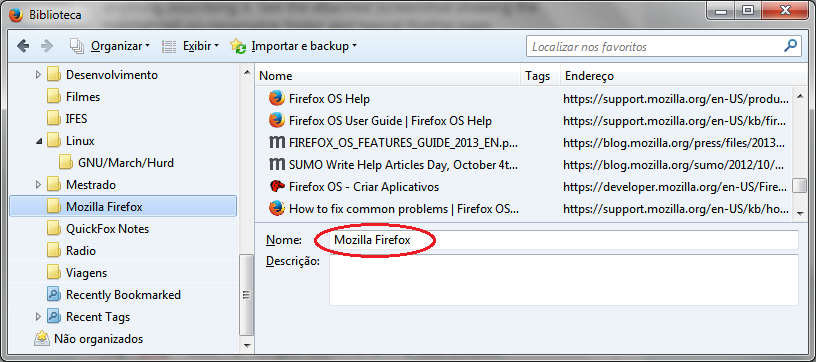
You can use "Bookmarks > Show All Bookmarks" to open the Library.
I still have found no way to rename the existing bookmarks FOLDER - not the bookmark name itself. I have a big folder tree of my bookmarks and one is titled "New Folder." (I must have removed my finger too soon after creating it.) and I simply want to give it its proper name.
If you select this folder in the left pane then you should see its name in the details panel at the bottom right and be able to change the name. You can also select the parent folder and select this folder in the right pane.
If that doesn't work then there might be a problem with the places.sqlite database file.
I do not see a "details panel at the bottom right".... How do I turn that on? What is it? I searched for the term "details panel" and could not find anything describing it. See the attached ScreenShot showing the highlighted un-renamable folder and typical FireFox page.
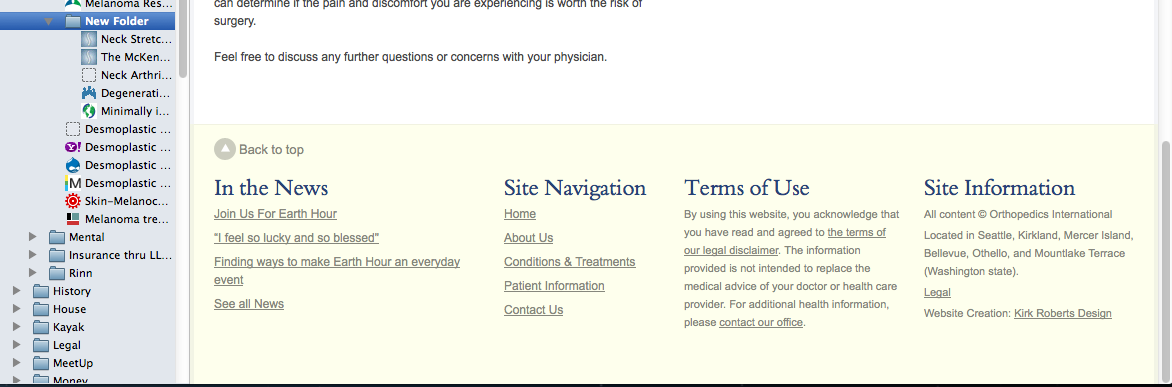
This is about the Bookmarks Manager (Library).
- Bookmarks > Show All Bookmarks
- https://support.mozilla.org/kb/how-do-i-use-bookmarks
Выбранное решение
In Windows to open bookmarks in a new window I use Ctrl + Shift + B.
Try use CMD + SHIFT + B in the Mac.
Изменено Anderson
You are using the bookmarks sidebar. You need to use the bookmarks Library to follow these instructions, or to do actions such as backing up bookmarks.
- general information Restore bookmarks from backup or move them to another computer
Use bookmark folders to organize your bookmarks
Note if you right click the bookmark folder you should get an option to rename the folder. (The same goes for bookmarks)
Thank you, cor-el! Now that I know to go to "Show All Bookmarks" I can see the folder name and revise it.
Thank you very much!!!
Acweller, I am a Mac user, not a Windows user.
Here is the easiest way. Right click the bookmark (on the taskbar) then click properties. In the small window that will pop-up, you will see the current name in blue highlight - so change it to whatever short name you want it to be - then save. All done!!