


I have added some sound files to my daughter's website (using Homestead as host). Sound files control bar doesn't show up right (but it does in IE). Any ideas?

In Firefox the control bar is gray and the play button kind of fades into the bar. In IE, it looks like it is suppose to - dark grey/black control bar with a big blue circle (on the left) with a bright white arrow inside of it (making it obvious as to how to play the mp3).
Все ответы (6)
I'm uploading an image of the two sound bars side by side. The one on the left is Firefox (and not desireable). The one on the right is IE and is the way this is suppose to look.

Your system details list shows that you have both the new WMP plugin (np-mswmp.dll) and the classic WMP plugin (Npdsplay dll).
Try to disable or uninstall the latter (Npdsplay dll) to see if that makes Firefox use the new WMP plugin.
See "Manually uninstalling a plugin":

That interface is entirely based on what plugin is being used. For IE, it looks like Windows Media Player, and in your Firefox screenshot, it looks like the QuickTime plugin is being used.
Attached is what it looks like for me (Firefox on Mac). And it looks that way in Safari as well.
As a user, you could stop Quicktime from being used for audio/mpeg files, using the instructions at https://support.mozilla.org/en-US/kb/quicktime-plugin-play-audio-and-video#w_embedded-media
As a web-developer, if you want to control the media player interface, it might be better to convert your site to HTML5, then use the <audio> tag which doesn't require any plugin. For more info, read https://developer.mozilla.org/en-US/docs/Using_HTML5_audio_and_video
You should probably ask in a web-developers forum.
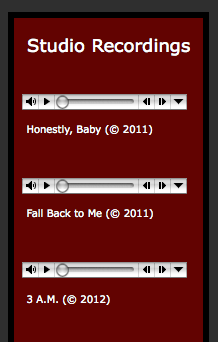
cor-el - solution did not work. but thx anyhow
Изменено ezstone
Chris - I'm beginning to think you are right. How it appears is completely dependent upon the browser being used so no matter what I do on my end, how it looks will ultimately be controlled by the viewer's browser. This site is on Homestead (Intuit). I am NOT a website designer (and very green when it comes to html codes, etc.). I've picked up a few little html hints but most of all the work is already done for me within their template. I have searched for a free audio player that either can be imbedded into the site or provides me with an html to use but sadly I haven't yet been able to figure out how to use those that I've found online.
I'm assuming that even though the control bar doesn't look like I want it to, you were still able to play the sound files?
Thanks so much for your help.
I hadn't checked the page, but I did now.
Those three players on the left are MP3 files that are played via an embed tag without specifying a content type.
On Windows Firefox will always use the QuickTime player to play such media files because the is the only player that supports the .mp3 file extension.
Firefox will only use the Windows Media Player if that is specified via a type="application/x-mplayer2" attribute.
I'm on Linux and can't check how it looks on Windows with the QuickTime player (the QT player needs much less space than the WMP player).