


My comcast e-mail has a pre-view screen and I can not get into my full e-mail box

When I select view full e-mail it recycles back to the e-mail preview screen...I can not open my full e-mail in box
Все ответы (6)
Выбранное решение
Switch to the Xfinity Connect Lite interface in Xfinity Connect preferences.
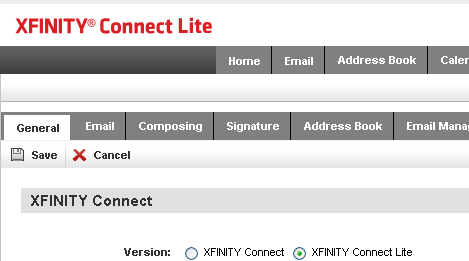
Wow just like that and I have the solution! I can't tell you how much time I wasted getting the run around from comcast on this one. Thank you so much.
Jim
When I click on Preferences it bounces me back, too.
Then make that change using IE, if you're in a Windows PC, or use Safari on a Mac. That setting is saved on the Xfinity server, Connect or Connect Lite is for all browsers.
Okay. I did use IE and got Connect Lite. It workds but I don't like the format of the page. Maybe I'm better off using Connect with IE. I think something needs to be done with the next version of Firefox.
The problem with Connect and Firefox is something that Comcast needs to fix. The regular Connect worked fine in Firefox last spring when the Xfinity interface replaced the Zimbra interface which was used for two years, this problem didn't surface until late summer after Comcast fixed something else in the Xfinity interface.