


Can't download PDF files

When I attempt to download PDF files I am getting the following message in the downloads window "Download error /Users/MY NAME/Downloads/Schedule_Card_10_8_11_thru_4_30_12_CC-1-1.pdf could not be opened, because an unknown error occurred.
Try saving to disk first and then opening the file." What am I doing wrong.
Все ответы (5)
You mean you want to download PDF files to your own PC?
If so, open Adobe Reader, go to Edit | Preferences | Internet and remove the checkmark from "View PDF in browser". See screenshot.
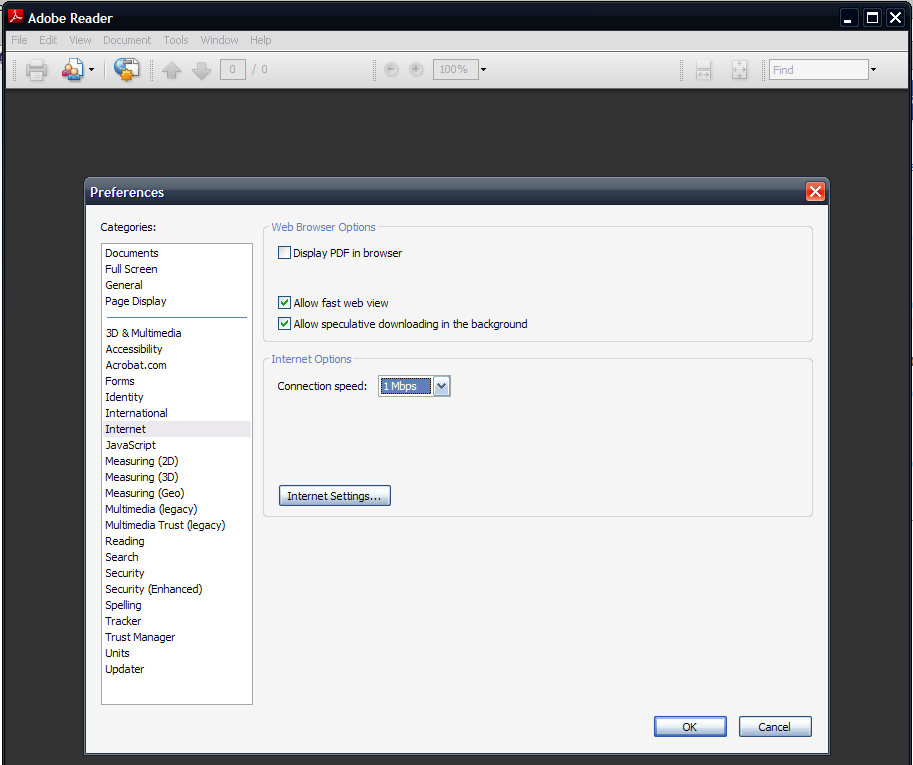
I am using Mac Os 10.6.7, Foxfire 4.0, and Adobe Reader X V10.0.2. In adobe Reader I went to Preferences | Internet and it shows "Web Browser Options" the first box is grayed and checked which reads "Display PDF in browser using:" under that is "/Applications/Adobe Reader.app" can not uncheck the box
Try going to Tools | Add-ons | Plugins and disable Adobe Reader.
Adobe Reader is not in the plugins
That would explain why you see it greyed out in the Preferences menu.
Try doing this: Go to Help | Repair Adobe Reader Installation.
Where did you get it from? Not by clicking a link in an email purporting to come from Adobe I hope. That's a phishing scam. See Adobe Reader 2011