Help is needed to “Restore prior sessions” before 11:00 PM on 11/08/26 if at all possible?

Hoping to restore Firefox with tabs that existed yesterday evening in two separate windows but were inadvertently lost due to mishitting “Restore prior sessions” and then compounding it by thinking recent tabs were being retrieved but were replaced with older unneeded tabs instead. Submitted again to correct retrieval from incorrect (today) to yesterday 11/8/26 (correct)
Все ответы (3)
Do not close or restart Firefox, and check out How to restore a browsing session from backup — esp. pay attention to sections that mention making a copy or a backup of something — this is important as if there was a relevant backup, it won't necessarily persist with subsequent restarts.
In my experience, if I start Firefox, open some tabs/windows, and then use
History > Restore Previous Session
Firefox adds the previous session tabs and windows to my existing section so I can keep everything. I don't know why you had a different experience.
If they were closed recently, you should be able to find them on the History menu. Either:
- main menu button > History > Recently closed windows
- (menu bar or Alt+S) History > Recently closed windows
If they aren't listed as closed, could you open Firefox View? Either:
- Click the file cabinet icon at the left end of the tabs bar (if available)
- Type or paste about:firefoxview in the address bar and press Enter to open it
- Use the Toolbar customization feature to add the Firefox View button to a convenient place on your toolbar and then click the button (Customize Firefox controls, buttons and toolbars)
On the Firefox View page, click Open Tabs. These should be grouped by window. Can you find the missing tabs/windows here?
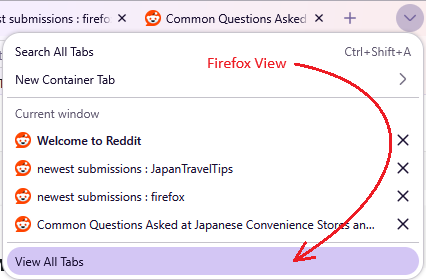
I found the other way to get to Firefox View, which is from the "View All Tabs" option on the Tabs list.