


Firefox keeps clearing cookies of sites that are allowed in exemptions

Hi, I am on Firefox 159.0 and I am having troubles with cookies being cleared on sites that I have allowed under Privacy and Security > Browsing data > Managing exceptions and Clear cookies and site data every time you close Firefox. I have GitHub ("https://github.com") allowed in the exceptions and if I restart Firefox after signing in, then I am logged out of GitHub. Is there any way to fix this?
Все ответы (2)
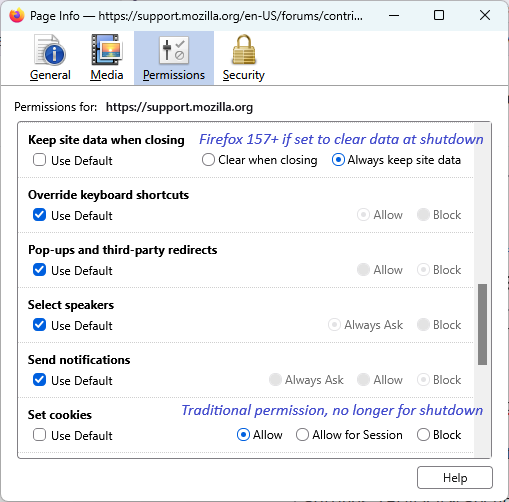
It's in the Page Info Permissions.
Выбранное решение
Until recently, cookie "Allow" permission did double-duty both during browsing and for "Clear history when Firefox closes" purposes. Now, there are two separate lists for those different functions. Existing cookie permissions were duplicated to the new list automatically to avoid disruption but any sites that weren't already on the Allow list have to be added directly to the new list.
You can do that using either:
- the Page Info dialog (Ctrl+i when you are on the page) - see TyDraniu's reply
- Settings > Privacy and security > History > Choose what you want Firefox to remember > Manage Exceptions - for more control over the host/domain name you Allow