v158.0.1 was a disaster for bookmarks and print 1

This category seemed the most appropriate from the list. Bookmarks are the first of 2 issues I need help with.
On my first start after upgrading to v158, all my bookmarks are missing, normally shown in a sidebar. All the suggested means of getting bookmarks back via a profile simply did not work: the restore panel asks for a file and all the various bookmarks in a profile are in a folder. the 2 did not mix. I do have exported bookmarks as a json file, but obviously it's hidden for FF, but not for explorer. Nothing recommended in the articles worked. In frustration, I removed the software and downloaded a new copy. Same issues applied. I copied the latest json file to the desktop, and restored it from there. AND after a restart, there were none of those bookmarks on the browser page. BUT selecting managing bookmarks and there they all are.
So how do I get the bookmarks from the management page to the normal user interface??
I am running win10 in the ESU program on this machine
Все ответы (2)
If Firefox starts up after an update without your bookmarks and other settings, check whether your data is available in a different profile:
Inside Firefox, type or paste about:profiles in the address bar and press Enter/Return to load it. The About Profiles page will open. This page should list at least one profile and could list many.
The profile that Firefox is currently using will show:
This is the profile in use and it cannot be deleted.
Please do not delete anything here; don't use any Remove buttons.
Do you have another profile named default or default-longnumber listed on this page? If so, you can check whether it is the one you were using recently by clicking its Launch profile in new browser button.
If it isn't what you want, simply close that new window.
If it IS what you want, click the Set as default profile button for that profile on the about:profiles page. Firefox will use it automatically at the next startup.
For more information see Recover user data missing after Firefox update or reinstall.
Note: If your bookmarks are not available in another Firefox profile, see Recover lost or missing Bookmarks for other solutions.
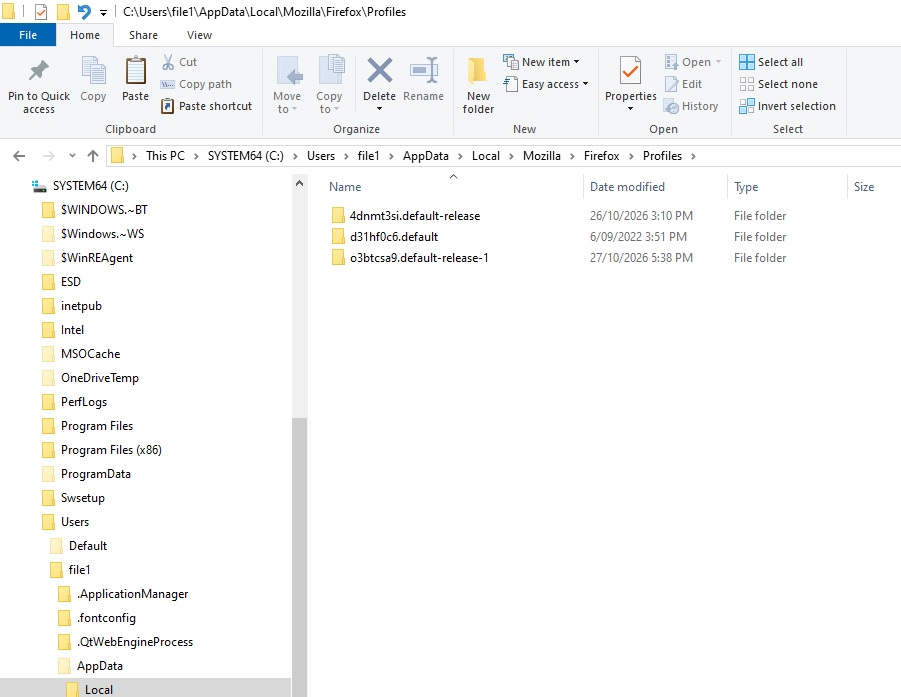
Thanks Paul, Frankly, I find profiles to be confusing. The about:profiles suggests that they enable a different world, but there are no examples I saw of why a user would want to behave differently between occasions of using a browser. I've attached a screenshot of the profiles on the affected machine. They are all labelled "default" in some way. Frankly, several observations fall out this: 1 - FF should not, repeat NOT, allow any change from the operating regime when doing an update. It would have saved me 2 days of stress & cursing the FF developers. 2 - the description of profiles needs to be expanded considerably re why they are needed, how to change them for specific results and ensure they are changed with a positive lock on no change without a users OK.
I did eventually by experiment manage to find a way to promote the bookmarks in the manage window, using the method of enabling the bookmarks icon in the toolbar: the click and close method suggested did not work, but I found that click and drag did. Now all I have to do is go thru them all and ensure they are current (since the time they were exported 2 years ago), delete those that aren't and include ones that are. What a pain. See observation 1 above.