


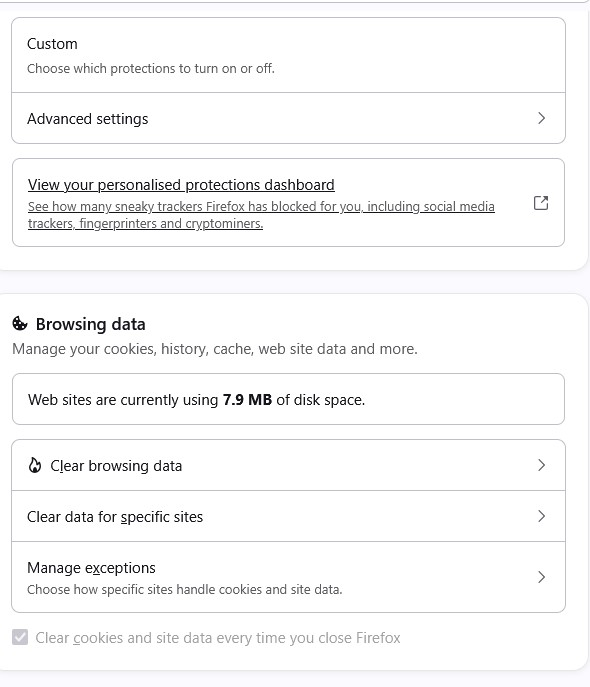
Clear cookies and site data greyed out

For the last three days or so I have been haivng problems with loggin in to sites. I no longer log in automatically to my many of the sites I use, particularly those set for my home page such as IMDB.com, ebay, web.whatsapp.com etc. Everytime I restart firefox I have to log in again. This started I think wit hthe latest update 155.0.1 (my current version) installed 5th sept 26 or 155.0 installed 3 sept 26
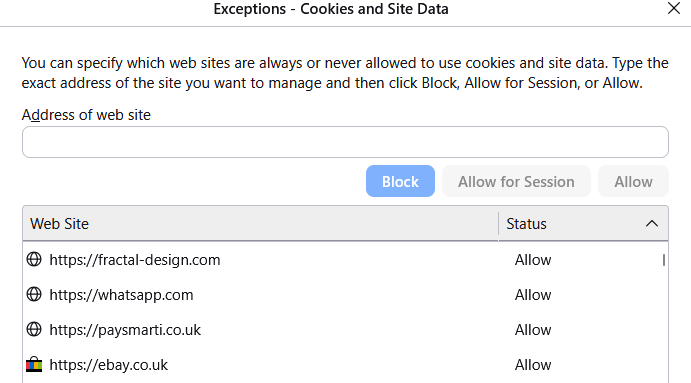
It doesn't seem to be reading the cookies that exist. I have it configure so all cookies are cleared on exit except those in the exception list, which are those for my home page plus about 30 others I log into. There is definitely cookie data there for these sites. I hve tried everythinig but this clearly seems to be a bug. at the moment I am using Opera since the necessity to keep loggin in to every site every time is just too much.
Все ответы (2)
Your image doesn't show the exception part that you mention.
I am not aware that you can select certain cookies to keep if you clear cookies when closing Fx
If you click the manage exceptions option then it wil lshow the expections list. This has always been there for 3rd party cookies and has always worked without issue... till a few days ago. Chrome stopped offering this option which is the reason I changed to Firefox about 3 or so years ago..
I suppose what I'm really asking is if there isn't a fix, it possible to roll back an update becaue then I could simply do this then disable updates till the bug has been fixed
Изменено gull_ducott