Открытый
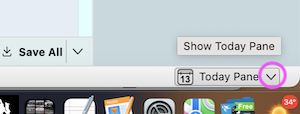
I do not use (need) the Today Pane. How do I remove it?

As explained in the subject line - title, I do NOT need nor use the Today Pane.
It use taking up needed space for the down arrow & popping up distracting me.
How do I eliminate it? I will even, if necessary edit Thunderbird to get rid of it.
'AND bold text' somehow, a new version of Thunderbird was created - downloaded and all my passwords AND bookmarks are gone. I looked for the profile, but it's new so does not contain passwords NOR bookmarks.
THANKS! Remain WELL & be SAFE!
Robin
As explained in the subject line - title, I do NOT need nor use the Today Pane.
It use taking up needed space for the down arrow & popping up distracting me.
How do I eliminate it? I will even, if necessary edit Thunderbird to get rid of it.
'''AND''' bold text'''''' somehow, a new version of Thunderbird was created - downloaded and all my passwords AND bookmarks are gone. I looked for the profile, but it's new so does not contain passwords NOR bookmarks.
THANKS! Remain WELL & be '''SAFE!'''
Robin
Все ответы (2)

For the layout, you can customize: https://support.mozilla.org/en-US/kb/how-change-thunderbird-layout
The most simple way to hide the Today Pane is a left-click on the Today Pane button, under the condition that the Status Bar is activated (=default).