


Thunderbird Memory Usage

hi :-)
My Thunderbird uses between 19 and 34 GB of RAM. It's cyclical (with a period of about 10 minutes).
What do you suggest?
Do I need to perform a performance diagnostic? https://support.mozilla.org/en-US/kb/profiling-thunderbird-performance
Do I need to follow all the steps listed on https://wiki.mozilla.org/Thunderbird:Testing:Memory_Usage_Problems#Diagnosis_Steps, or can I skip some of them?
Все ответы (1)
You do have an issue. But there are some quick steps you can try before going all in. I have included them below the image.
Just for some comparison, I have Thunderbird on windows 11 with Windows defender for an antivirus. My 30+ Gb profile on the ESR version uses less than 1.5Gb and the daily build with a small testing profile and a couple of accounts uses less than .5 just happened to have chrome with 4 tabs and Firefox with dozens open when I made the screen shot.
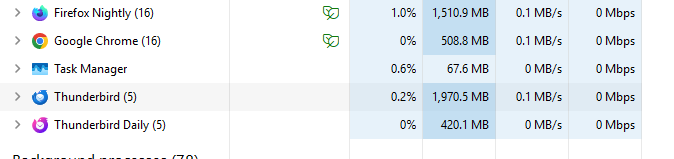
To diagnose problems with Thunderbird, try one of the following:
- Restart Thunderbird with add-ons disabled (Thunderbird troubleshooting Mode). On the Help menu, click on "Troubleshooting mode". If Thunderbird works like normal, there is an Add-on or Theme interfering with normal operations. You will need to re-enable add-ons one at a time until you locate the offender.
- Restart the operating system in safe mode with Networking. This loads only the very basics needed to start your computer while enabling an Internet connection. Click on your operating system for instructions on how to start in safe mode: Windows 10, Windows 8, Windows 7, Windows Vista, Windows XP, OSX
- If safe mode for the operating system fixes the issue, there's other software in your computer that's causing problems. Possibilities include but not limited to: AV scanning, virus/malware, background downloads such as program updates.