


Windows 10 reached EOS (end of support) on October 14, 2025. If you are on Windows 10, see this article.

Поиск в поддержке

Избегайте мошенников, выдающих себя за службу поддержки. Мы никогда не попросим вас позвонить, отправить текстовое сообщение или поделиться личной информацией. Сообщайте о подозрительной активности, используя функцию «Пожаловаться».

Подробнее
Открытый

i build an automation tool by using your firefox dev addition but recently i am seeing this agree to terms popup i wanna know how can i stop that or agree to that with fags like start firefox with fags which disable or auto agree to that

TyDraniu отвечено
Vibeshiftbots

Hello,

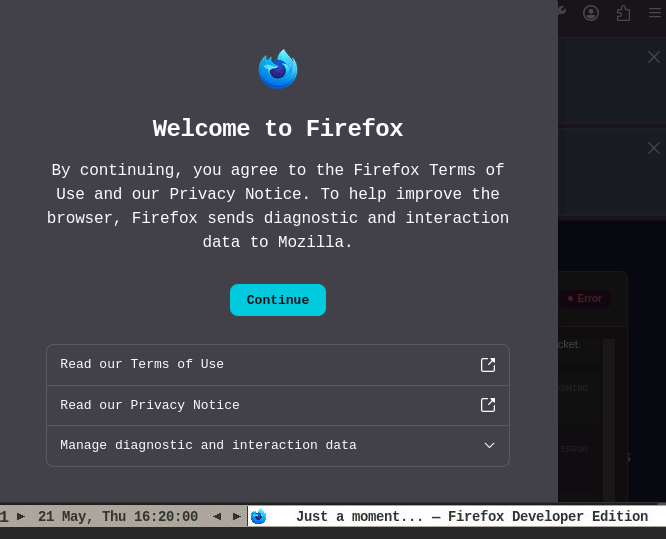
I am building a browser automation tool using Firefox Developer Edition. Recently, I started running into an issue where an "Agree to Terms" (or Privacy/Welcome) popup appears when the browser launches.

Because this is an automated environment, this popup blocks my scripts from running properly because human interaction is required to click past it.

My Setup:

Browser: Firefox Developer Edition (latest version)

Use case: Automated testing/scripting

What I am trying to achieve: I need to know how to stop this popup from appearing entirely, or how to automatically agree to it. Are there specific command-line flags (similar to Chrome's startup flags) or about:config profile preferences I can inject when launching the browser to bypass this?

I have attached a screenshot of the exact popup I am seeing.

Any advice on the exact flags or preferences needed to silence this for automation would be greatly appreciated. Thank you!
Hello, I am building a browser automation tool using Firefox Developer Edition. Recently, I started running into an issue where an "Agree to Terms" (or Privacy/Welcome) popup appears when the browser launches. Because this is an automated environment, this popup blocks my scripts from running properly because human interaction is required to click past it. My Setup: Browser: Firefox Developer Edition (latest version) Use case: Automated testing/scripting What I am trying to achieve: I need to know how to stop this popup from appearing entirely, or how to automatically agree to it. Are there specific command-line flags (similar to Chrome's startup flags) or about:config profile preferences I can inject when launching the browser to bypass this? I have attached a screenshot of the exact popup I am seeing. Any advice on the exact flags or preferences needed to silence this for automation would be greatly appreciated. Thank you!
Приложенные скриншоты

Все ответы (1)

You have to set up the SkipTermsOfUse policy.

Задать вопрос

Для ответа на сообщения вы должны войти в свою учётную запись. Пожалуйста, задайте новый вопрос, если у вас ещё нет учётной записи.