


Where is "Just go to about:config and switch browser.tabs.groups.enabled to false"? All I can find is that response when searching for a way to turn off tab grouping in Firefox.

That tab grouping "feature" really is too much like modern software developers' tendency to roll out a new "feature" and turn it on automatically no matter how annoying some users may find it. Some times when a mouse cursor goes too far and wanders into that tab zone, Firefox starts grouping tabs. Please allow us to turn the thing off.
Выбранное решение
Hello
Tab groups in Firefox https://support.mozilla.org/en-US/kb/tab-groups
For information, https://connect.mozilla.org/t5/discussions/seeking-your-feedback-on-tab-groups/m-p/120395/highlight/true#M47167
Since the release of https://www.firefox.com/en-US/firefox/150.0/releasenotes
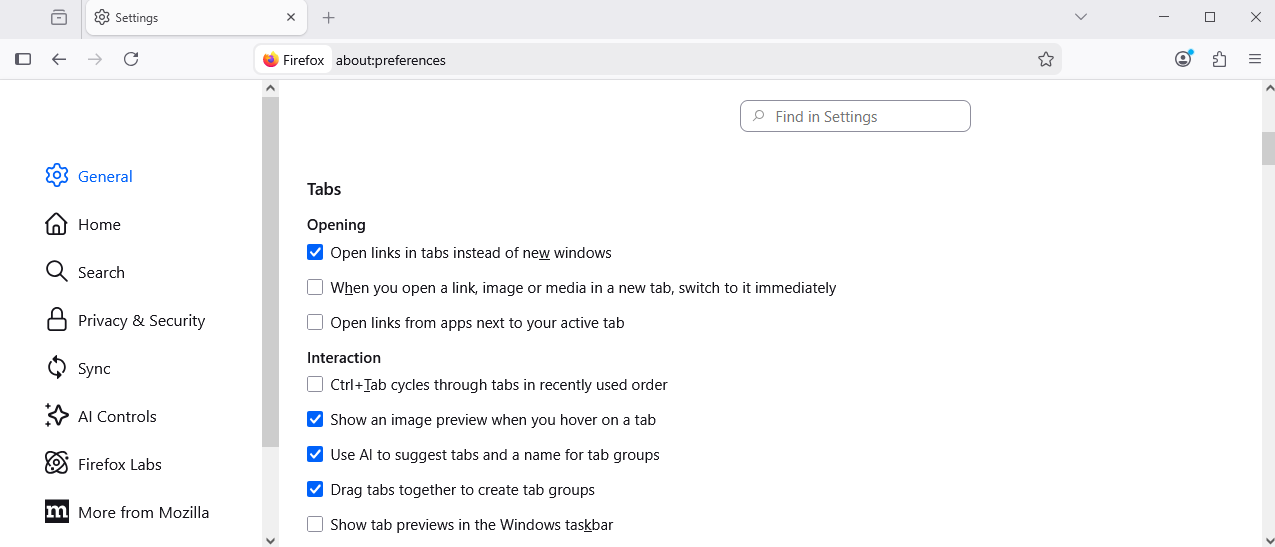
If you prefer creating tab groups from the context menu, you can now turn off drag-and-drop group creation in Settings > Tabs > Drag tabs to create tab groups
Uncheck, Drag tabs together to create tab groups
Прочитайте этот ответ в контексте 👍 0Все ответы (3)

"switch browser.tabs.groups.enabled to false"? All I can find is that response"
So have you tried that ?
UPDATE:
Yes just found it. Default was on ? Never noticed it was there, nor by the accident you refer to.
Well now it is 'false' :)
b.gregorythomas said
Where is "Just go to about:config and switch browser.tabs.groups.enabled to false"?
In the Location (address) bar type in about:config with a colon : and then in search bar about you can search for browser.tabs.groups.enabled
about:config is more for advanced users https://support.mozilla.org/en-US/kb/about-config-editor-firefox
Another about: url that is useful is about:about as it lists all about url's for that Firefox version.
Выбранное решение
Hello
Tab groups in Firefox https://support.mozilla.org/en-US/kb/tab-groups
For information, https://connect.mozilla.org/t5/discussions/seeking-your-feedback-on-tab-groups/m-p/120395/highlight/true#M47167
Since the release of https://www.firefox.com/en-US/firefox/150.0/releasenotes
If you prefer creating tab groups from the context menu, you can now turn off drag-and-drop group creation in Settings > Tabs > Drag tabs to create tab groups
Uncheck, Drag tabs together to create tab groups
Изменено Agent virtuel