Multiple accounts

My wife and I both have Thunderbird accounts. The issue is that when we open Thunderbird, both accounts show on one screen. Is there any way to separate logins and only show each of our accounts on the screen?
Thanks, Sam Orner
Все ответы (3)

You can create a separate profile for each of you. This way, when you start Thunderbird you will first see the Profile Manager and can choose which of two to use for that session.
Here's an article about Profiles and how to use them:
https://support.mozilla.org/en-US/kb/profile-manager-create-and-remove-thunderbird-profiles
Lin, My wife and I have separate profiles. When I open Thunderbird, both accounts with our folders show at the same time, first mine (which I'm guessing is the default) then my wife's. How can I get the Profile Manager to show before it opens both accounts? Sam
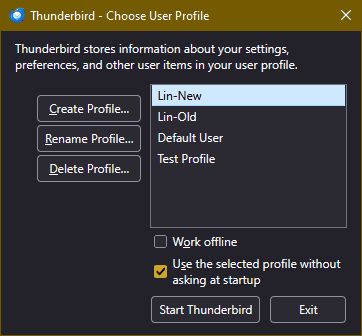
I think you mean you both have separate email accounts. "Profiles" are like two separate setups that don't see each other. To start with the profile manager, close down Thunderbird, and (I assume you use Windows), press Winkey+R, which brings up the Run dialog box. In the box type "thunderbird -profilemanager" or "thunderbird -p" (no quotes). This brings up the profile manager (see attached image below.) Here you can create a new profile for her and, by unchecking the "Use the Selected Profile without asking" option, tell Thunderbird to bring up Profile Manager each time the program is invoked; then you choose one Profile or the other. Her newly-created Profile would be like a brand-new installation and she would have to add her email account, set preferences, install add-ons, etc.
I might suggest copying the existing Profile as another name, then adding it to the Profile Manager. Then go to each one in turn and remove the unwanted email account. That would save setup time for her. This would involve some copying of files outside of Thunderbird, which you may or may not feel comfortable with. If you are, let me know and I'll guide you through it.