


Why am I getting an error message trying to access paying Xfinity?

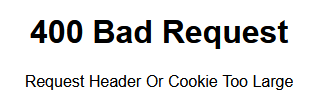
I am getting an error message when I'm trying to pay my Xfinity bill in my account (for at least 2 months now). I have to switch to Chrome to be able to complete this transaction. I don't have an issue with any other sites.
I am getting an error message when I'm trying to pay my Xfinity bill in my account (for at least 2 months now). I have to switch to Chrome to be able to complete this transaction. I don't have an issue with any other sites.
Все ответы (1)
This error can be caused by corrupted cookies.
Clear the Cache and remove the Cookies for websites that cause problems via the "3-bar" Firefox menu button (Settings), click the padlock icon (Clear cookies and site data) for the domain in the selected tab.
"Remove the Cookies" for websites that cause problems:
- Settings -> Privacy & Security
Cookies and Site Data: "Manage Data"
"Clear the Cache":
- Settings -> Privacy & Security
Cookies and Site Data -> Clear Data -> [X] Cached Web Content -> Clear