


Windows 10 reached EOS (end of support) on October 14, 2025. If you are on Windows 10, see this article.

Поиск в поддержке

Избегайте мошенников, выдающих себя за службу поддержки. Мы никогда не попросим вас позвонить, отправить текстовое сообщение или поделиться личной информацией. Сообщайте о подозрительной активности, используя функцию «Пожаловаться».

Подробнее

Tabs sharing over local network even though Sync is disabled

  • Нет ответов
  • 0 имеют эту проблему
  • 45 просмотров
  • Открыта

Hello, I have multiple devices using Firefox on the same network, and whenever using them at the same time, I get an additional Firefox icon in my doc which will open whatever tab is up on the other device. I was not signed in to any account on either device, yet it is still sharing tab data across devices.

I then created an account and signed in on one device and disabled every Sync option I could find, but still the sharing is enabled over local network. How do I disable this so there is no communication between the two devices?

Device 1 - MacBook Pro (Retina, 13-inch, Early 2015) macOS Monterey 12.7.6 Firefox Version 149.0.2

Device 2 - MacBook Pro 14-inch, 2023 macOS Sequoia 15.4.1 Firefox Version 149.0.2 Local Network access disabled for Firefox in macOS settings

It doesn't seem like this should even be possible given that local network access is disabled for the one device, and neither device is logged into a mozilla account.

Can someone please help me disable this functionality?
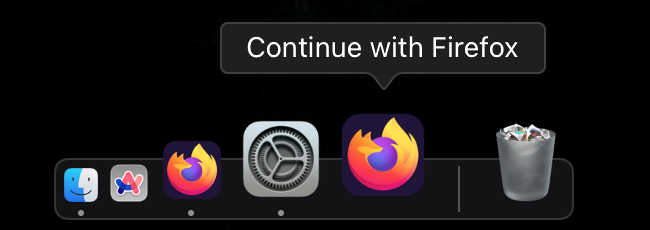
Hello, I have multiple devices using Firefox on the same network, and whenever using them at the same time, I get an additional Firefox icon in my doc which will open whatever tab is up on the other device. I was not signed in to any account on either device, yet it is still sharing tab data across devices. I then created an account and signed in on one device and disabled every Sync option I could find, but still the sharing is enabled over local network. How do I disable this so there is no communication between the two devices? Device 1 - MacBook Pro (Retina, 13-inch, Early 2015) macOS Monterey 12.7.6 Firefox Version 149.0.2 Device 2 - MacBook Pro 14-inch, 2023 macOS Sequoia 15.4.1 Firefox Version 149.0.2 Local Network access disabled for Firefox in macOS settings It doesn't seem like this should even be possible given that local network access is disabled for the one device, and neither device is logged into a mozilla account. Can someone please help me disable this functionality?
Приложенные скриншоты

Для ответа на сообщения вы должны войти в свою учётную запись. Пожалуйста, задайте новый вопрос, если у вас ещё нет учётной записи.