click on address book and it says set up wont open address book
when i cick on adrress book it just s ays what to set up. no longer just opens the address book
Выбранное решение
If you are clicking the 'addressbook' link from menu bar, it appears that it is linking to the account setup menu. That indicates something is amiss. try clicking help>troubleshootmode and click 'restart' to see if the issue remains. if it does, I suggest reinstalling thunderbird over the existing version. I am clueless on what would cause that.
Прочитайте этот ответ в контексте 👍 0Все ответы (5)
Can you post a screenshot of the error message? I've never seen such. Do you not have any addresses in addressbook? Is this a new setup of thunderbird?
it's not an error message not new set up and all addresses are in address book But ifyou click on address book link it says choose what you w ant to set up (e mail, chat, etc). previously it opened the address book Now i have to press control shift B to open it
Выбранное решение
If you are clicking the 'addressbook' link from menu bar, it appears that it is linking to the account setup menu. That indicates something is amiss. try clicking help>troubleshootmode and click 'restart' to see if the issue remains. if it does, I suggest reinstalling thunderbird over the existing version. I am clueless on what would cause that.
re :But ifyou click on address book link
That sounds like you clicked on the 'Menu app icon' (3 lines) and selected 'New Account' - it also has the 'New Address Book' option, but that is not what you are looking for.
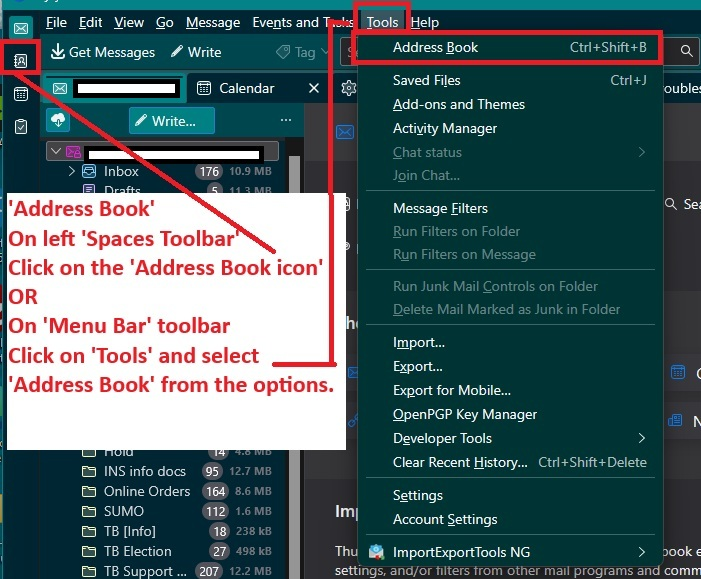
The 'Addess Book' icon link is in the 'Spaces Toolbar' usually visible on the far left of window. See image below More info:
OR if using the 'Menu Bar' toolbar - the one that says 'File', 'Edit', 'View', 'Go' etc, click on 'Tools' and select 'Address Book'. See image below OR You can add an 'Address Book' icon link to the 'Unified Toolbar' which is at the top and it contains the 'Global Search'.
- Right click on 'Unified Toolbar' and select 'Customise'
- At the top - You need to have the 'Mail' tab selected
- Under 'Available for all spaces' section
- Locate and drag the 'Address Book' option onto the Unifed Toolbar
- click on 'Save' button located bottom right.
More info on Unified Toolbar: https://support.mozilla.org/en-US/kb/unified-toolbar
If you need to see the image much larger - in this forum question, clickon the thumbnail icon and it displays bigger.