


How do we make left column show everything below last Account name?

Preamble:
- There are 34 email Accounts listed in left column.
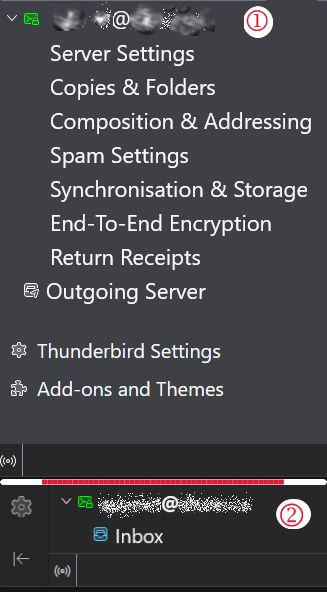
- (Image 1) When in "Mail" column I can see down to only the Account Name (address). There is only the Account Name and Inbox.. nothing else below that can be seen - no Drafts, Sent, Archives, Spam, or Deleted. Anything below is missing too.
- When choosing "Account Setting", everything for last account shows up, plus Outgoing, Add-ons (Image 2). Too, we can see the Offline/Online Icon.
QUESTION: How may I fix it so that the last account shows all sub-sections of the account - i.e., Server Settings, Copies & Folders etcetera right on down to Online/Offline or at best, down to "Return Receipts" for the last account?
Thanks for volunteering, ~r
Изменено redacted
Выбранное решение
What happens if in Account Settings you manually move the very last account (the problematic one) just above the account before the last? Now in folder pane your problematic account should be displayed in the before last position: can you see the other folders of this account now?
Прочитайте этот ответ в контексте 👍 0Все ответы (5)

redacted said
@ Rick @Matt @Rick Sorry for delay. I have been sick and read too much news. :) Please look at the attached new image. This was very hard to create even on a 49" with monitor. I rotated my screen to vertical (screen - not entire monitor to include the entire left column. Look at the top to confirm the view of the contents. Then look at the bottom of the column. At the very bottom of the list, where "Inbox" is visible, there is a black on black mini line. Below the last "Inbox" at the bottom, should also show Draft, Sent, and Deleted. No Spasm yet. Just like all the rest above it. If I were to guess, I'd say the code behind that 'column' does now allow any more lines, such as Draft, etcetera. Please, study the image. I think it easily explains the problem. Thanks everyone for your help and patience with me, ~r
Is that account an IMAP account?
Выбранное решение
What happens if in Account Settings you manually move the very last account (the problematic one) just above the account before the last? Now in folder pane your problematic account should be displayed in the before last position: can you see the other folders of this account now?
@Rick
"Is that account an IMAP account?"
No. I try to keep it all POP3. Why? Because I am the person that reads the Terms Of Use, Acceptable Use Policy, and Privacy Policy. ToU, AUP, and PP and add to that:
Reuters Sep 4, 2025 — Sept 3 (Reuters) - A federal jury determined on Wednesday that Alphabet's Google (GOOGL.O), opens new tab must pay $425 million for invading users' privacy by continuing to collect data for millions of users who had switched off a tracking feature in their Google account.
and many, many more similar reasons to use Email (it's yours) over Webmail (it's 🕵 theirs)
~r