


This profile was last used with a newer version of this application. Please create a new profile.

Mozilla made an update of my Firefox installation on my Win11 laptop. all my password disappeared as well as my history and bookmarks.
I have now a virgin installation and is starting from scratch.
Now I get this error message: "This profile was last used with a newer version of this application. Please create a new profile." I deleted met shortcut and I opened Firefox by using Windows search. Now I see 4 profiles! I think I do not need to create a new profile. Maybe delete 3 of them ? What to do ? And, how?
Все ответы (3)

mikael.boldt, I wouldn't delete any profiles as one of them may contain the missing bookmarks and passwords etc.
To try and see if one of them does, follow this guide: https://support.mozilla.org/en-US/kb/recover-user-data-missing-after-firefox-update
If you can't launch Firefox because of the 'used with a newer version' message then you can either create a new profile as suggested, or you can bypass Firefox's downgrade protection and force it to open with a profile from a newer version with the "-allow-downgrade" command line argument.
See here for more information on using Firefox with a command line argument, but note the caution under the "-allow-downgrade" heading: https://wiki.mozilla.org/Firefox/CommandLineOptions
Изменено TechHorse
OK. Now I have collected all my usernames and password. However, I still get this error: "This profile was last used with a newer version of this application. Please create a new profile."

I don't know what you are doing or why you are getting the "Please create a new profile" error but, to force Firefox to start with a profile used in a newer version:
Right-click the Windows Start  button, select Run, enter one of the following commands in the Run dialog and click OK:
- firefox.exe -P -allow-downgrade
.... or, use the full path to firefox.exe enclosed in quotes, for example:
- "C:\Program Files\Mozilla Firefox\firefox.exe" -P -allow-downgrade
The Firefox - Choose User Profile window should open.
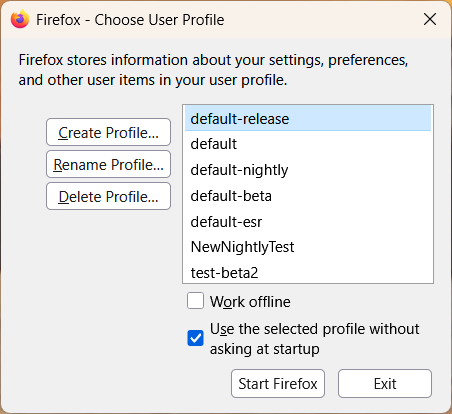
Select the profile you wish to use in the Firefox - Choose User Profile window and click Start Firefox.
Изменено AliceWyman