


How to Remove Profile names, tabs and menu item

Linux User So. I recently followed a Mozilla guide, previously posted, and something that I did, or changed, I now have a very annoying "profile" name in the title bar. Further to that, I now have an additional menu option called "Profiles", with --"profile --Add Profile
Manage Profiles
I have never had or seen these items, except when I've moved my profile from an old computer to a new computer, using the console of "firefox -P" command.
It is becoming very annoying as I only have one profile, and I don't want an more.
Question. How to I block the display of 'profile information' ? Thanks
Выбранное решение
You did nothing to cause this. It's the new Profiles system, described here: Manage Firefox profiles.
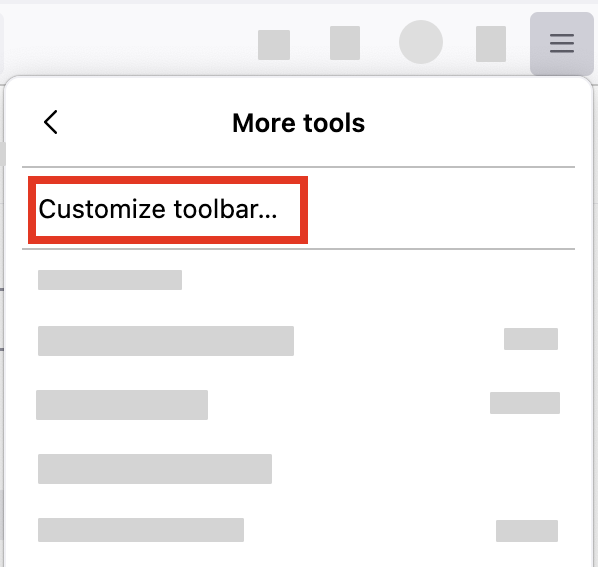
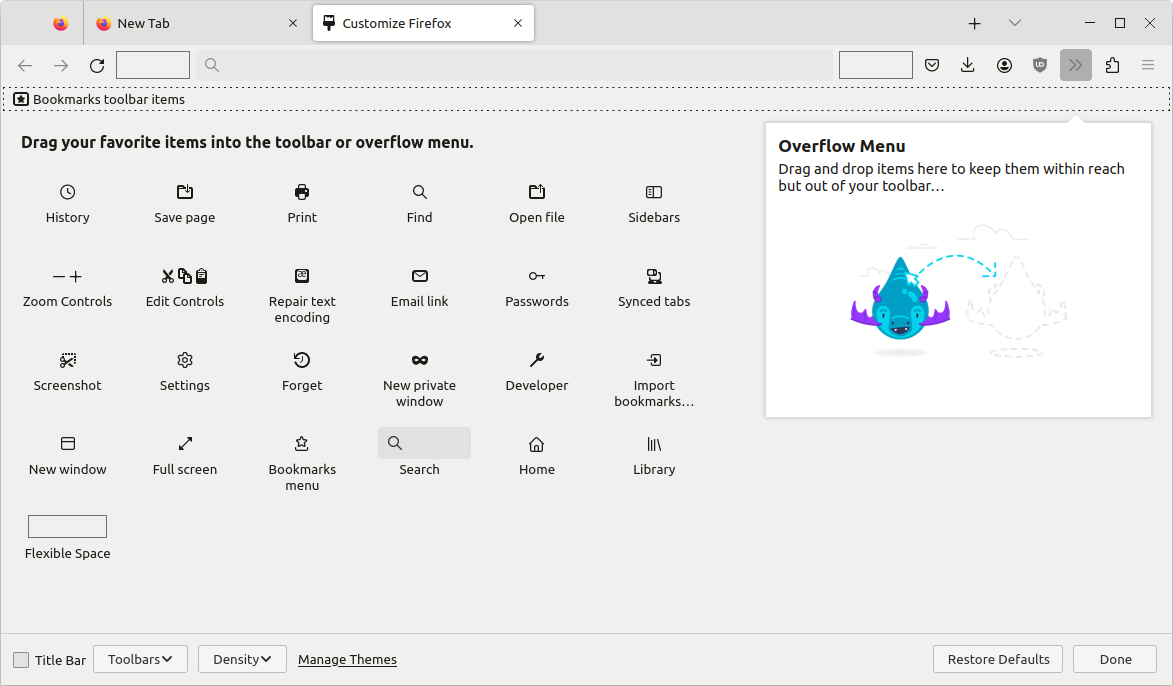
You can remove the Title bar, if you wish by customizing Firefox:
- Click the menu button
 in the top-right corner, click "More tools", and choose "Customize toolbar".
- You can then uncheck the box for Title Bar setting at the bottom of the Customize window.
For more information see Customize Firefox controls, buttons and toolbars.
Others have complained about seeing "Original profile" in the Title bar. See https://connect.mozilla.org/t5/discussions/unnecessary-quot-original-profile-quot-in-window-title/m-p/112240#M43392
Прочитайте этот ответ в контексте 👍 0Все ответы (3)

Выбранное решение
You did nothing to cause this. It's the new Profiles system, described here: Manage Firefox profiles.
You can remove the Title bar, if you wish by customizing Firefox:
- Click the menu button in the top-right corner, click "More tools", and choose "Customize toolbar".
- You can then uncheck the box for Title Bar setting at the bottom of the Customize window.
For more information see Customize Firefox controls, buttons and toolbars.
Others have complained about seeing "Original profile" in the Title bar. See https://connect.mozilla.org/t5/discussions/unnecessary-quot-original-profile-quot-in-window-title/m-p/112240#M43392
Thanks AliceWyman I finally found the issue, after clicking on the link, you provided. FireFox suddenly decided that it wanted my profile in in the original folder, not my preferred PROFILE folder.
Thanks for posting back. I'll mark this question solved since you found the issue after clicking on the link in my first reply.