


Windows 10 reached EOS (end of support) on October 14, 2025. For more information, see this article.

Поиск в поддержке

Избегайте мошенников, выдающих себя за службу поддержки. Мы никогда не попросим вас позвонить, отправить текстовое сообщение или поделиться личной информацией. Сообщайте о подозрительной активности, используя функцию «Пожаловаться».

Подробнее

How can I remove the settings from my sidebar?

  • Нет ответов
  • 0 имеют эту проблему
  • 4 просмотра

Hi All:

I just got a new laptop and so I am getting everything set up the way that I like it. I have come across a problem with my sidebar though. I like to keep my bookmarks up all the time, but I want them to not be too wide and take up a lot of my screen. On this new computer, there's an addition 5 cms or so of white space at the far left of the tool bar. It had different buttons on it up at the top (one of them had something to do with AI) and a little gear down at the bottom of the space. I was able to remove all of the buttons up at the top, but I can't seem to hide the whole thing. I just want to see my bookmarks, without that extra customization sidebar. Is there a way to hide the spot highlighted in pink, but still have the bookmarks visible?
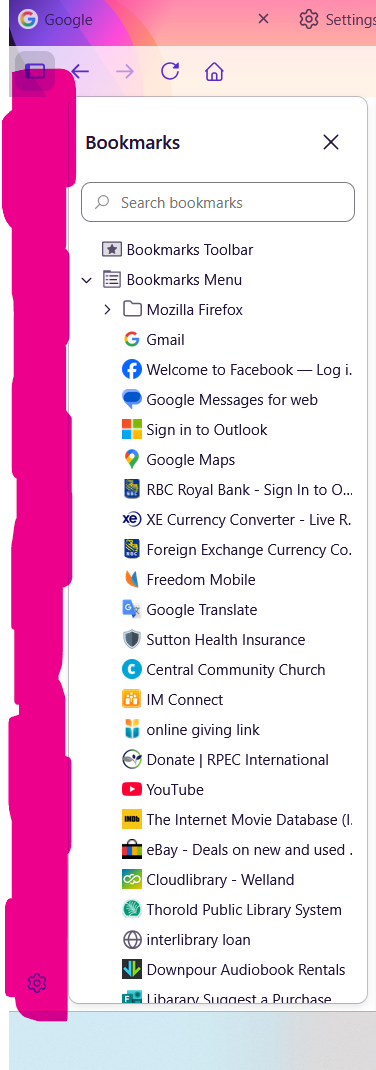
Hi All: I just got a new laptop and so I am getting everything set up the way that I like it. I have come across a problem with my sidebar though. I like to keep my bookmarks up all the time, but I want them to not be too wide and take up a lot of my screen. On this new computer, there's an addition 5 cms or so of white space at the far left of the tool bar. It had different buttons on it up at the top (one of them had something to do with AI) and a little gear down at the bottom of the space. I was able to remove all of the buttons up at the top, but I can't seem to hide the whole thing. I just want to see my bookmarks, without that extra customization sidebar. Is there a way to hide the spot highlighted in pink, but still have the bookmarks visible?
Приложенные скриншоты

Для ответа на сообщения вы должны войти в свою учётную запись. Пожалуйста, задайте новый вопрос, если у вас ещё нет учётной записи.