


Syncing tabs isn't working

I use an iMac (2019) and MacBook (2015) but my tabs aren't syncing between the two.
I've refreshed the syncing a few times but the MacBook is still showing two lots of tabs for the iMac, and both of them are showing pages that are no longer open.
I'd really like to be able to move between the two so if anyone has any suggestions on how to get FireFox to sync, I'd be really grateful. :-)
I use an iMac (2019) and MacBook (2015) but my tabs aren't syncing between the two.
I've refreshed the syncing a few times but the MacBook is still showing two lots of tabs for the iMac, and both of them are showing pages that are no longer open.
I'd really like to be able to move between the two so if anyone has any suggestions on how to get FireFox to sync, I'd be really grateful. :-)
Все ответы (2)
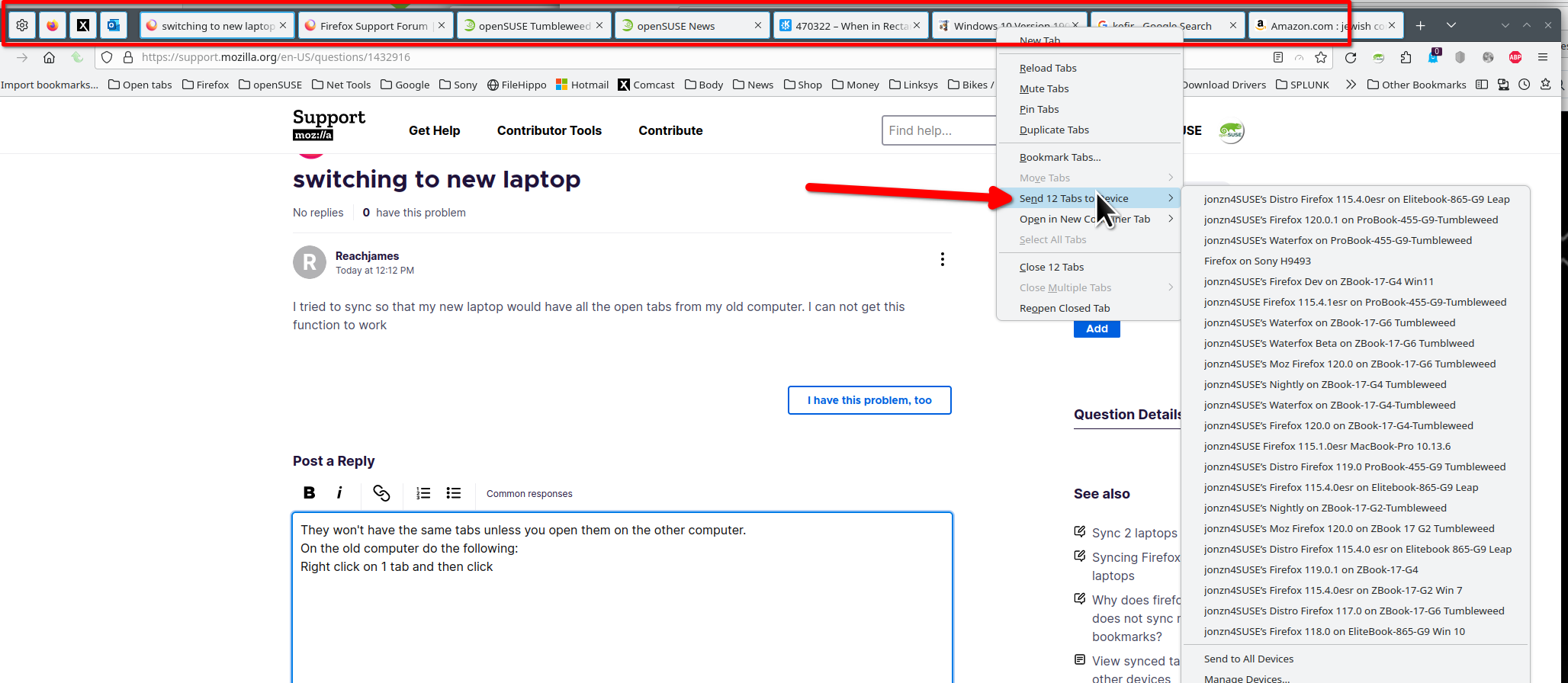
How about selecting all tabs on mac1 and then right click on one of them and then send them to mac2.
This question has been locked because the original author has deleted their account. While you can no longer post new replies, the existing content remains available for reference.