Outlookからインポートしたメッセージの文字化け

Outlookからインポートしたメッセージが文字化けしています。正しく表示する方法を教えてください。メニューバーに該当するものが見つからなかったです。
Выбранное решение
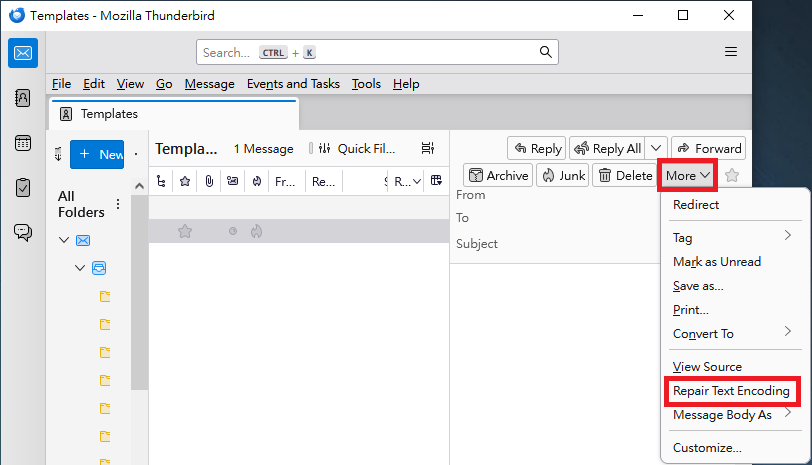
The following steps might be helpful: In the Message List Pane, click the message which displays garbled characters. > In the Message Pane, click "More" in the upper right corner. > Click "Repair Text Encoding".
Please see attached image.
Прочитайте этот ответ в контексте 👍 0Все ответы (2)
I am not skilled in Outlook, but you will need to post in detail how you did the import. I say that because Thunderbird can only import when the Outlook account is on the same PC. Otherwise, third-party tools are usually needed.

Выбранное решение
The following steps might be helpful: In the Message List Pane, click the message which displays garbled characters. > In the Message Pane, click "More" in the upper right corner. > Click "Repair Text Encoding".
Please see attached image.