


Problem with virtual files.

Suddenly I cannot see and work on Virtual Files in the Main Inbox. I cannot choose files in the designed box. (This happens only on one of my PCs)
Все ответы (6)
I am unclear on what you mean by virtual files. More detail may help. thanks.
Sorry, I meant "Virtual Folders". It's the first inbox in the folder columne on the left. One can put there more virtual folders normally but I cannot. That's the problem. I have "Grouped Folders".
Do you mean 'unified folders?" Please describe, in detail, what is not working. unified folders are usually automatic, collecting common folder names across accounts. thank you
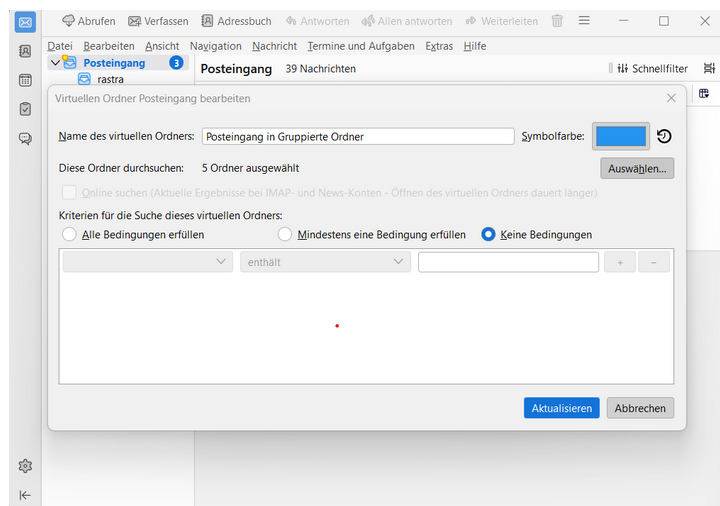
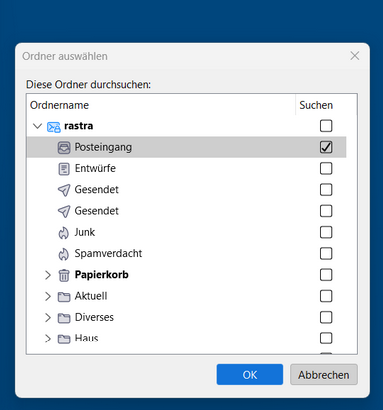
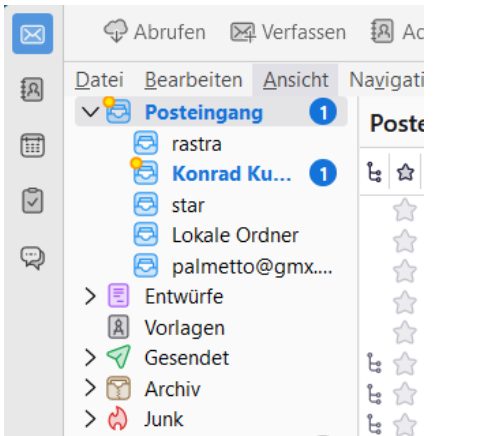
Both Deepl and ChatGPT say that “Grouped Folder” is the best translation of the German “Gruppierte Ordner.” Unified Folder sounds similar, so it could be the equivalent at Mozilla. Please check this. I can't describe the problem any better than I did, as I don't have the technical background and the English vocabulary. With my description of the problem (view/top of left column/folder name: inbox), you should be able to find the folder in question, which can set up and collect virtual folders. Suddenly, it's no longer working for me on one of my PCs. I add you 3 screenshots to show you the views: 1) shows how it should look but at my LG. Unfortunally it shows only the inbox but with no needed subfolders. 2) shows the view where I normally can choose the folders I want to collect under 1). 3) shows the menu where I can define the folders which should be grouped in 1) (but this doesn't work!!!). Hope this is helpful for you. Rainer
Please explain what you want to achieve. Unified folders only accept folders that have the same name in multiple accounts, such as inbox, sent. A folder that has a unique name cannot be in the unified folders folder.
Sure they have the same name as the original folders, I need it just to get the access to all the inboxes easier at one place. I think that's why they're called "virtual". Remember that everything worked perfectly before. The problem might have started with an update.... All my other Thunderbirds on other computers are still fine. Couldn't my screenshots help you?